TL;DR
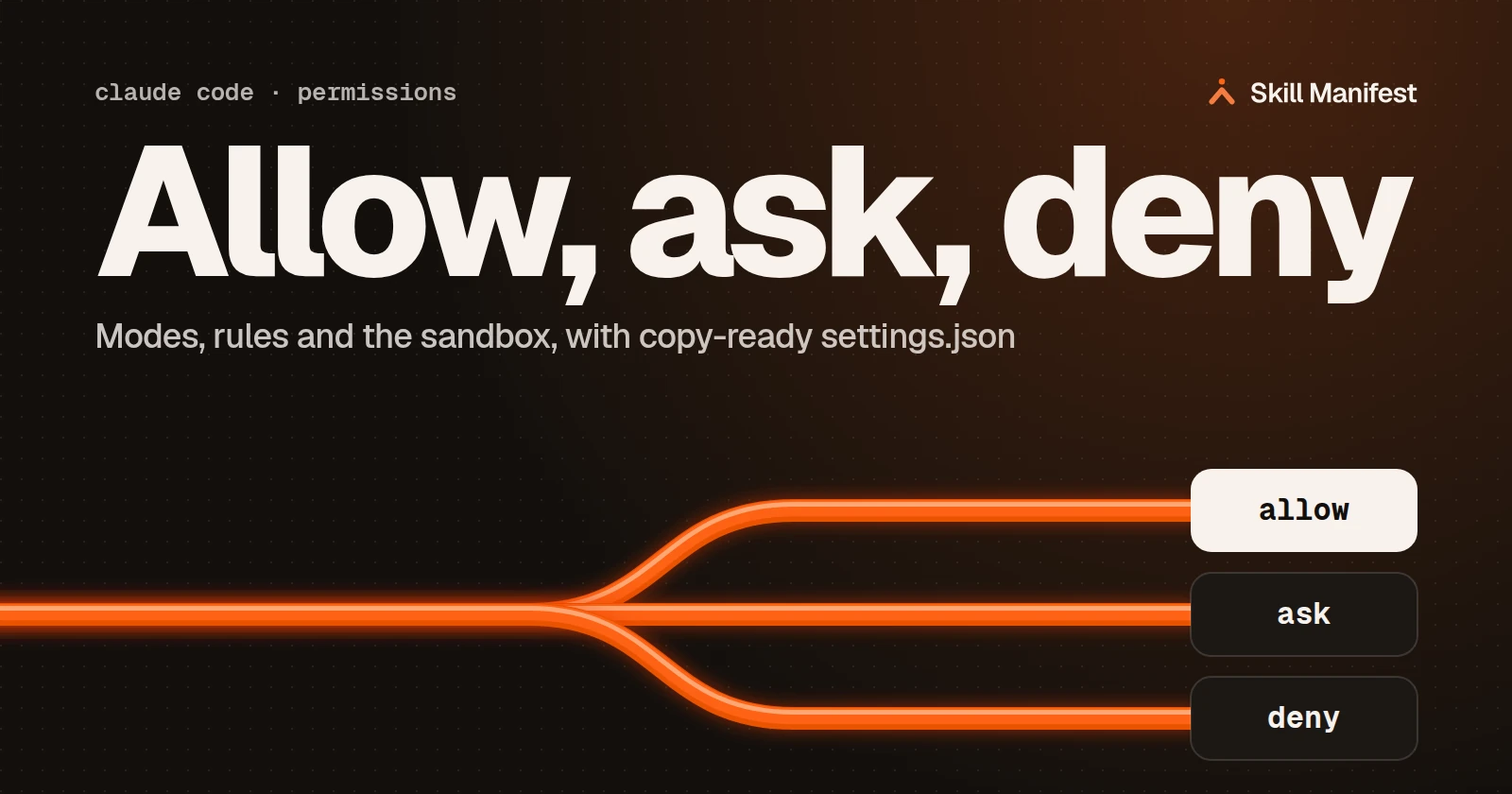
- Three layers, three jobs. A permission mode sets what runs without asking. Allow, ask and deny rules refine it. The sandbox is separate: the operating system limits what a shell command can touch once it runs.
- Deny beats ask beats allow, in every scope. The first match in that order wins, and a narrow allow cannot carve an exception out of a broad deny. A deny in your user settings beats an allow in a project file.
- Check your starting mode. Interactive sessions start in auto mode from 2.1.283, where auto mode is available.
claude -pstarts in Manual from 2.1.302. Auto mode drops broad allow rules when you enter it. - One new setting, one changed default.
permissions.denyInsteadOfPromptingarrived in 2.1.319 (6 November 2026). Sandboxed Bash now follows the normal permission flow unlesssandbox.autoAllowBashIfSandboxedistrue. The changelog files that under 2.1.325 (13 November 2026); the settings reference says "before v2.1.324".
How do Claude Code permissions work?
Claude Code permissions are three layers that people often mix up. A mode decides whether Claude asks before acting. Rules pre-approve, force a prompt for, or block specific tools. The sandbox limits what a shell command can reach after it starts. Permission rules are enforced by Claude Code, not by the model: the docs say instructions in your prompt or CLAUDE.md shape what Claude tries, but they don't change what Claude Code allows.
This guide follows the official docs and changelog as we read them on 15 November 2026, when the newest changelog entry was 2.1.325. On our own machine we ran read-only commands on Claude Code 2.1.319: claude --version, claude --help, claude auto-mode defaults, and claude doctor on example settings files in scratch folders. Nothing here reports how the classifier judged a real command.
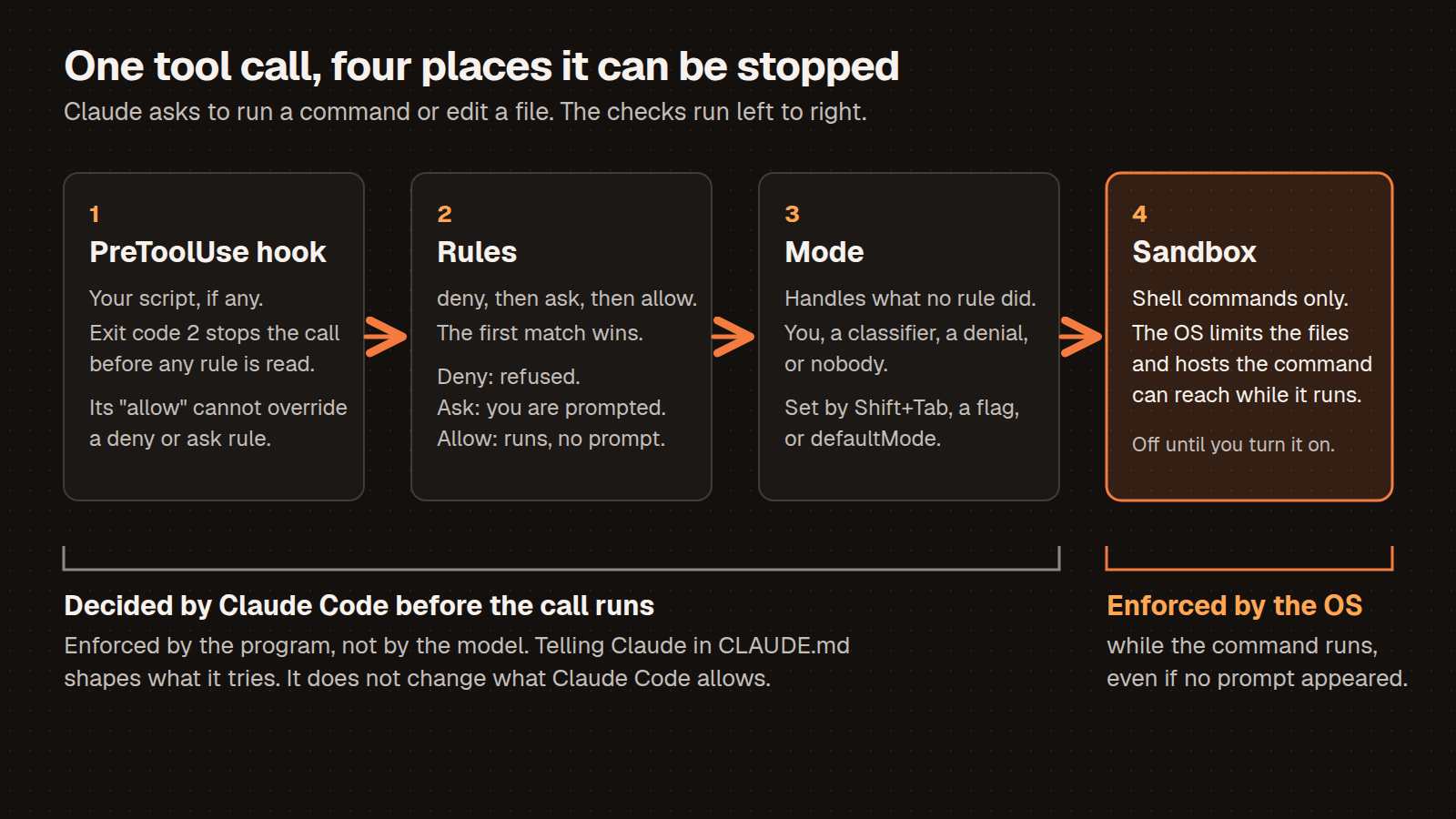
One tool call passes a hook, then rules, then the mode. Those three are decided by Claude Code before the call runs. Only the sandbox is enforced by the operating system while it runs.
| Layer | It decides | You set it with | Enforced by |
|---|---|---|---|
| Mode | What happens to a call no rule settled | Shift+Tab, --permission-mode, permissions.defaultMode | Claude Code |
| Rules | Which tools and patterns run, prompt or are refused | permissions.allow, ask, deny, /permissions | Claude Code |
| Sandbox | What a shell command can read, write and reach | /sandbox, the sandbox block | The operating system |
What are the six Claude Code permission modes?
A permission mode sets which actions Claude can take in a session without asking you first. Manual is the label you see in the CLI, and default is its config value.
| Mode | Runs without asking | Fits |
|---|---|---|
Manual (default) | Reads only | Reviewing every action |
acceptEdits | Reads, file edits, and common filesystem commands such as mkdir, touch, mv and cp | Iterating on code you review in git diff |
plan | Reads, plus classifier-approved commands when auto mode is available | Exploring before changing anything |
auto | Everything, with background safety checks | Long tasks and prompt fatigue |
dontAsk | File reads in your working directories and pre-approved tools; anything that would prompt is denied | CI and scripts |
bypassPermissions | Everything | Isolated containers and VMs only |
claude --help on 2.1.319 lists the choices as acceptEdits, auto, bypassPermissions, manual, dontAsk and plan. The CLI takes manual as an alias; hooks and SDK integrations use the config value default.
Which mode does a session start in?
A new terminal session takes its mode from the first of these that applies: the --permission-mode flag, permissions.defaultMode in a settings file, then the built-in default. The built-in default is the part that changed:
- Interactive terminal and VS Code sessions:
autowith Claude Code 2.1.283 or later. Before that,autoonly on some plans. claude -pand Agent SDK runs: Manual (default) with 2.1.302 or later, when no mode is set. A call that needs approval is denied unless an allow rule, hook or callback approves it.- Auto mode unavailable (a settings file turns it off, the model isn't supported, or Anthropic switched it off server-side): the session starts in Manual instead.
One trap catches teams. auto and bypassPermissions set as defaultMode in a project's .claude/settings.json or .claude/settings.local.json don't take effect. A repository can't start your session in either. Put auto in ~/.claude/settings.json if you want it as your default.
Shift+Tab cycles default, acceptEdits and plan during a session. auto joins the cycle when it's available, bypassPermissions only after you started with a flag or setting that enables it, and dontAsk never appears: you set it with --permission-mode dontAsk.
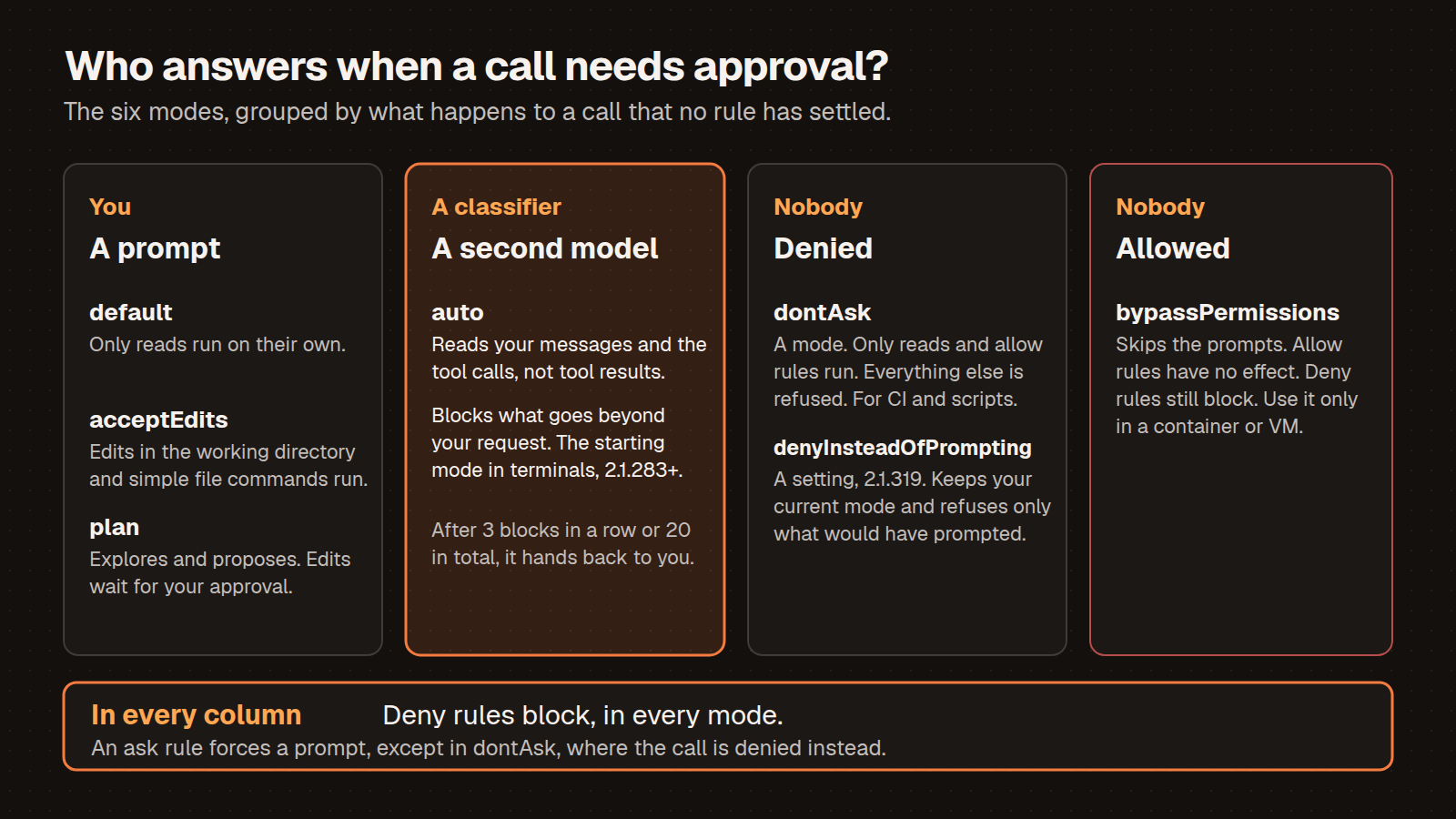
Group the modes by who answers. Deny rules block in every mode. An ask rule forces a prompt, except in dontAsk, where the call is denied instead.
How does auto mode decide?
In auto mode, a separate classifier model reviews actions before they run. It blocks anything that goes beyond your request, targets infrastructure it doesn't recognize, or looks driven by hostile content Claude read. Anthropic's engineering team explains why the mode exists: in practice users accept 93% of manual prompts, which leads to approval fatigue, where people stop paying close attention to what they approve.
Each action goes through a fixed order, and the first match wins:
- Your allow, ask and deny rules resolve it immediately, with exceptions such as writes to protected paths, which go to the classifier even when an allow rule matches.
- Read-only actions and file edits in your working directory are approved, except writes to protected paths and the first read outside the working directories, which prompt you.
- Everything else goes to the classifier, apart from critical-path removals.
- If the classifier blocks, Claude receives the reason.
The classifier sees your messages, Claude's tool calls other than read-only lookups, and your CLAUDE.md content. Tool results are stripped from its requests, so hostile text in a web page can't talk to it directly. And a line like "never force push" in CLAUDE.md steers the classifier as well as Claude. For a rule that holds whatever the classifier decides, write a deny rule, and back it with the sandbox for anything that must not happen.
What it blocks by default includes curl | bash, force pushes, production deploys, sending sensitive data to external endpoints, and git reset --hard. On our machine, claude auto-mode defaults printed 16 allow entries, 72 soft_deny entries and 1 hard_deny entry on 2.1.319. claude auto-mode defaults --label 'Git Destructive' prints one rule's full wording.
Two things to hold at once. Anthropic reports that the classifier let through 17% of 52 real overeager actions from its own sessions, and it calls that the honest number. The docs add that auto mode reduces permission prompts but does not guarantee safety.
What auto mode drops on entry. Broad allow rules that grant arbitrary code execution are dropped: blanket Bash(*), wildcarded interpreters like Bash(python*), package-manager run commands, and Agent and Monitor allow rules. Narrow rules such as Bash(npm test) stay, and Claude Code restores the dropped ones when you leave auto mode.
When it falls back. If the classifier blocks an action 3 times in a row or 20 times in total, auto mode pauses and Claude Code resumes prompting. For headless runs, two Anthropic pages disagree (we read both on 15 November 2026):
- The permission-modes docs page says a
claude -prun without a--permission-prompt-toolhas no prompt to fall back to. The action doesn't run, Claude keeps working, and Claude Code doesn't stop the run. - Anthropic's engineering post on how it built auto mode says in headless mode there is no UI to ask the human, "so we instead terminate the process".
Whichever applies to your version, read permission_denials at the end of a CI run, as the CI setup below shows.
How do allow, ask and deny rules work?
Permission rules use the form Tool or Tool(specifier). /permissions lists every rule and the settings file it comes from.
| Rule | Effect |
|---|---|
Bash | Matches every Bash command (as a deny rule, it removes the tool from Claude's context) |
Bash(npm run build) | Matches that exact command |
Bash(npm run *) | Matches any command starting npm run |
Read(./.env) | Matches reading .env in the current directory |
WebFetch(domain:example.com) | Matches fetches to that host |
mcp__puppeteer__* | Matches every tool from the puppeteer MCP server |
In what order are the rules checked?
The permissions page states it outright: rules are evaluated in order: deny, then ask, then allow. The first match in that order determines the outcome, and rule specificity doesn't change the order. A broad Bash(aws *) deny blocks aws s3 ls even when a narrower Bash(aws s3 ls) allow exists.
Three consequences:
- A matching ask rule prompts even when a more specific allow rule also matches.
- Scope doesn't change the order: a user-level deny blocks a project-level allow, and a project deny blocks a user allow.
- A hook can't loosen a rule. Claude Code evaluates deny and ask rules whatever a PreToolUse hook returns, while a hook that exits with code 2 blocks the call before the rules run.
Since 2.1.319, a session's exact Bash or PowerShell ask rule is refused, not asked about, when a broader deny rule covers the command.
Why do guides disagree on precedence?
Because they were written at different times, and the product moved. We compared three pages that rank for this query with the official docs:
| Page | What it says | What the docs say today |
|---|---|---|
| A settings-hierarchy guide | Hooks, then deny, then allow, then ask, then the mode. Auto mode is a --enable-auto-mode research preview with criteria "not public" | Deny, then ask, then allow. Auto mode is the starting mode in interactive sessions from 2.1.283, and claude auto-mode defaults prints its rules |
| A "stop asking me" guide | "More specific wins: Local > Project > User", with deny winning at any level. Recommends dontAsk, allowing all Bash commands and denying a few | Deny rules from every scope are checked before allow rules. A Bash deny matches only the command as written, so a short deny list leaves other forms open |
| A permission-patterns article | Sandboxing has a "default autoAllowBashIfSandboxed: true" | The default is false now; the sandbox section below gives the version |
The "more specific wins" line is true for ordinary keys such as model, where a project-local value is applied over the shared file. Permission rules are the exception: lists merge, and deny is checked first across all of them.
What does a Bash rule not match?
A Bash rule matches the command text Claude writes. It doesn't match the same program invoked in a different form, so a deny rule is not a security boundary around a program:
| Rule | Stops | Doesn't stop |
|---|---|---|
Bash(curl *) | curl https://example.com | /usr/bin/curl https://example.com, sh -c 'curl https://example.com' |
Bash(rm *) | rm -rf build/ | /bin/rm -rf build/, bash -c 'rm -rf build/' |
Bash(git push *) | git push origin main | git -C . push origin main |
For filesystem and network limits that don't depend on the command text, the docs point to the sandbox. To inspect the full command with logic of your own, they point to a PreToolUse hook. Two more matching details:
- Put the
*after the subcommand.Bash(git log *)allows onlygit logcommands. InBash(git * main)the*stands in for the subcommand, so it matches every git subcommand and any option before it, including-c, which makes git run a program you name. - A compound command needs every part allowed.
Bash(safe-cmd *)won't approvesafe-cmd && other-cmd.
How do Read and Edit rules match paths?
Read and Edit rules use gitignore pattern syntax with four path anchors:
| Pattern | Meaning | Example |
|---|---|---|
//path | Absolute path | Read(//Users/alice/secrets/**) |
~/path | From your home directory | Read(~/Documents/*.pdf) |
/path | Relative to the settings file's source | Edit(/src/**/*.ts) |
path or ./path | Relative to the current directory | Read(*.env) |
/Users/alice/file isn't an absolute path: the single slash anchors at the settings source. In user settings, Read(/secrets/**) blocks ~/.claude/secrets/**, not a secrets folder in your project.
Claude Code checks files against Edit(path) and Read(path) rules only. Write(docs/**) and Grep(docs/**) are accepted but don't match anything. claude doctor catches this: on a settings file we wrote with three deliberate mistakes, it reported that Write(docs/**) is not matched, that Stop Task matches no known tool, and that Bash(command:rm *) will not match. Run it in the folder after every edit to the file.
A Read deny rule covers the built-in file tools and file commands Claude Code recognizes in Bash, such as cat. It doesn't cover grep -r run over a directory, or a script that opens files itself. For operating-system enforcement that blocks all processes from a path, the docs point to the sandbox.
Where do permission rules live, and which one wins?
Claude Code reads settings from four places:
| Scope | File | Who it affects |
|---|---|---|
| User | ~/.claude/settings.json | You, in every project |
| Shared project | .claude/settings.json | Everyone who clones the repo |
| Project local | .claude/settings.local.json | You, in this project only |
| Managed | managed-settings.json or other managed sources | Everyone your organization deploys it to |
For ordinary keys, the highest level that sets a key wins: managed, command line, project local, shared project, user. Lists such as permissions.allow merge instead of overriding. If a tool is denied at any level, no other level can allow it, and a managed deny can't be overridden by --allowedTools. Administrators who want managed settings to be the only source of rules can set allowManagedPermissionRulesOnly.
What "Yes, and don't ask again" does. For a Bash command or a WebFetch domain, Claude Code saves an allow rule to .claude/settings.local.json at the root of the git repository. The rule applies to future sessions anywhere in that repository. A file-edit approval isn't saved: it lasts until the session ends.
Why you can still get prompted. An allow rule in your local file doesn't outrank an ask rule from a project or managed file. And a project's permissions.allow rules grant capability, so Claude Code applies them only after you accept the workspace trust dialog; deny and ask rules apply right away. claude doctor in a scratch folder with a project settings file showed this directly: "Ignoring 3 permissions.allow entries from .claude/settings.json: this workspace has not been trusted."
To see what loaded, run /status for the settings sources, /permissions for the rules, and claude doctor for entries Claude Code rejected.
What does the Claude Code sandbox cover?
The Bash sandbox is a boundary that the operating system enforces around the shell commands Claude runs and the processes they start. It runs on macOS, Linux and WSL2, and it is off by default: turn it on with /sandbox or sandbox.enabled. On native Windows, Claude Code runs commands unsandboxed, so use WSL2.
By default a sandboxed command has this reach:
| Access | Default | Change it with |
|---|---|---|
| Writes | The working directory, a per-user temp directory and directories you added | sandbox.filesystem.allowWrite, denyWrite |
| Reads | Most of the machine, including credential files such as ~/.ssh and ~/.aws/credentials | sandbox.filesystem.denyRead, allowRead |
| Network | No direct route. A proxy checks each host against your allowed domains, which start empty | sandbox.network.allowedDomains |
| Environment variables | Inherited from Claude Code, secrets included | credentials, CLAUDE_CODE_SUBPROCESS_ENV_SCRUB |
The default sandbox lets commands read your home directory. It stops writes outside the project and blocks the network, but reads are open. Paths and domains from permission rules are merged into the final sandbox configuration, and the sandbox adds your Read deny paths to what sandboxed commands can't read. That's how a Read(~/.ssh/**) deny rule becomes a limit the OS enforces.
What runs outside the sandbox?
The sandbox covers shell commands only. The built-in file and web tools (Read, Edit, Write, WebFetch, WebSearch) follow permission rules instead. Command hooks, local MCP servers and helper commands such as your status line command run with your full access. So does a command you type yourself at the ! prompt in most sessions. A denyRead entry doesn't stop the Read tool, and allowedDomains doesn't limit WebFetch.
This is one reason to read a skill's scripts and hooks before running them; our post on whether Claude skills are safe covers what to check.
What does autoAllowBashIfSandboxed do now?
The sandbox has two modes. In auto-allow mode, sandboxed commands run without a prompt. In regular permissions mode, they go through the normal flow, so your allow rules and permission mode decide. The setting that picks between them is sandbox.autoAllowBashIfSandboxed, and its default changed.
The two official sources put that change in different releases:
- The settings reference (read 15 November 2026) says: default
false. Before v2.1.324, the default wastrue. - The changelog files it under 2.1.325, dated 13 November 2026: sandboxed Bash commands follow the normal permission flow by default, and you set
sandbox.autoAllowBashIfSandboxed: trueto keep running them without prompts. The entry below it is 2.1.323 (12 November 2026); the page has no 2.1.324.
Both agree that 2.1.325 and later default to false. On 2.1.324, open /sandbox and check the Mode tab, which calls the false setting regular permissions mode. We run 2.1.319, so we haven't seen the new default ourselves.
To keep the sandbox and the quiet behavior:
{
  "sandbox": {
    "enabled": true,
    "autoAllowBashIfSandboxed": true
  }
}
Even in auto-allow mode, a command in a form that a Bash deny rule matches is still blocked, and content-scoped ask rules like Bash(git push *) still prompt. Commands such as FOO=bar npm test go through the regular flow too.
What is the unsandboxed retry?
When a command fails inside the sandbox, Claude may retry it with dangerouslyDisableSandbox. In Manual and acceptEdits mode you get a prompt titled "Bash command (unsandboxed)". In auto mode the classifier evaluates the command. An allow rule that matches the command also approves its retry, so a broad allow rule can let a command leave the sandbox without a prompt.
To close that path, set "allowUnsandboxedCommands": false, which the docs call strict sandbox mode. A false in your user settings, --settings or managed settings holds even when a project file says true.
Limits worth knowing. The OS enforces the boundary on the running process, so it holds regardless of what the model chose to run, and Anthropic reports that sandboxing reduced permission prompts by 84% in its internal usage. The proxy decides from the hostname without inspecting TLS, so allowing broad domains such as github.com can create paths for data exfiltration. To confirm the sandbox is on, ask Claude to run touch ~/sandbox-probe and curl --noproxy '*' https://example.com; both should fail. Typing them at the ! prompt doesn't test it, because those commands usually run outside the sandbox.
What changed recently, and which version do you need?
Most "why is it different?" questions trace back to a version. Dates are from the changelog:
| Version | Date | Change |
|---|---|---|
| 2.1.283 | 25 September 2026 | Auto mode is the built-in starting mode for interactive terminal and VS Code sessions |
| 2.1.302 | 16 October 2026 | claude -p and SDK runs with no mode set start in Manual |
| 2.1.314 | 30 October 2026 | permissions.blockWritesOutsideWorkingDirectories added |
| 2.1.319 | 6 November 2026 | permissions.denyInsteadOfPrompting added; an exact ask rule is refused when a broader deny covers it |
| 2.1.325 | 13 November 2026 | Sandboxed Bash follows the normal flow by default (the settings reference says "before v2.1.324"); read-only git commands ask first in a repo that isn't the project's or one you trusted; scheduled tasks and /loop ask before running a skill that declares allowed-tools or hooks |
Run claude --version before you trust any row. If you're one release behind, the docs may describe something your binary doesn't do yet.
Which setup fits: solo, team repo or unattended CI?
Pick by who answers the prompts, then add the layers around it.
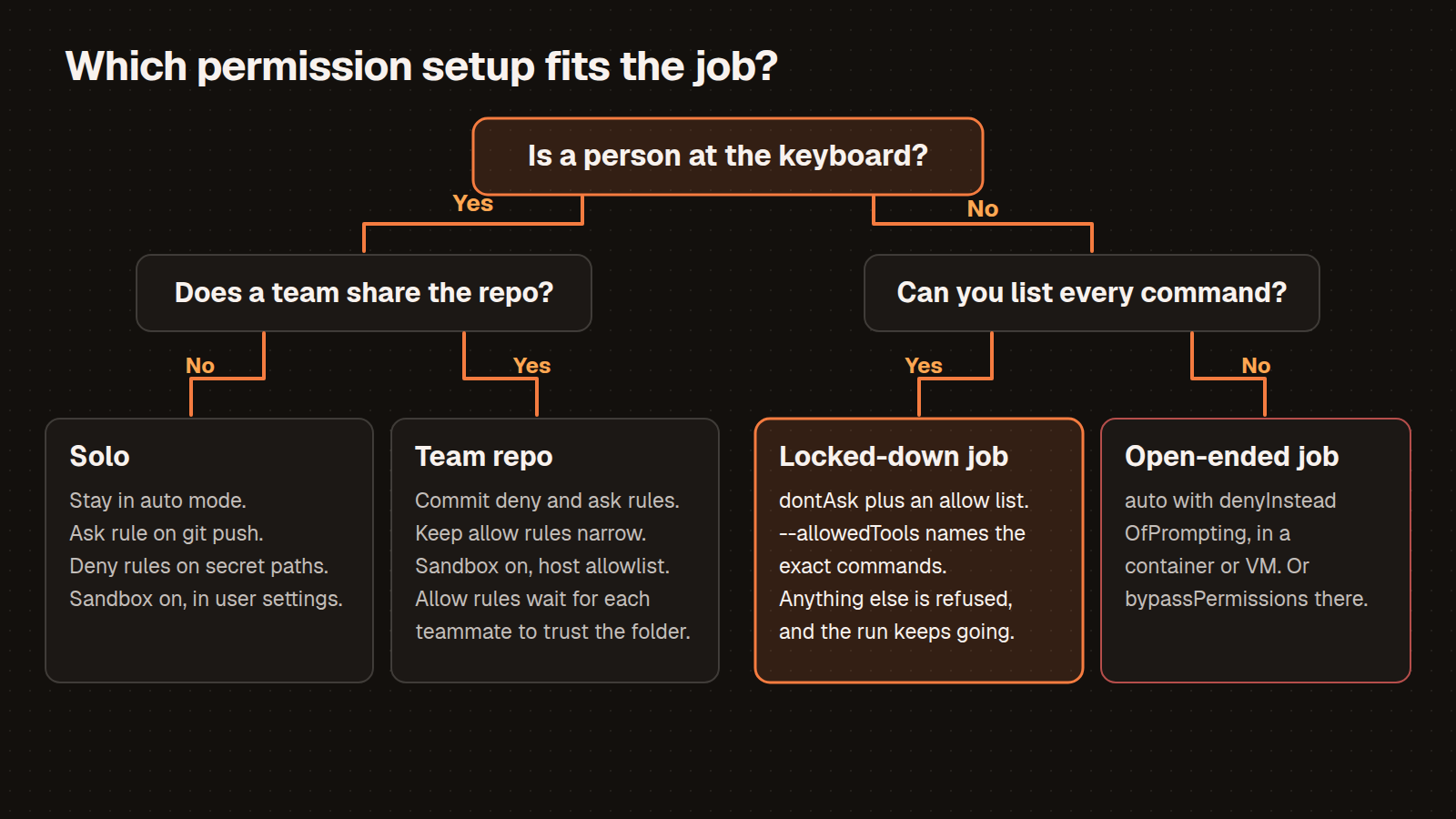
Start from whether a person is watching, then from whether you can list every command.
We ran claude doctor on a copy of each file below in a scratch folder. It reported no rule problems, apart from the notice that a folder must be trusted before project allow rules apply.
Solo developer
Stay in auto mode, which is already your default on 2.1.283 or later. Add the rules that should hold whatever the classifier decides, and turn the sandbox on. This goes in ~/.claude/settings.json:
{
  "permissions": {
    "ask": [
      "Bash(git push *)"
    ],
    "deny": [
      "Read(./.env)",
      "Read(~/.ssh/**)",
      "Read(~/.aws/**)"
    ]
  },
  "sandbox": {
    "enabled": true,
    "autoAllowBashIfSandboxed": true
  }
}
There is no Bash(npm run *) allow rule here on purpose: auto mode drops package-manager run commands, so we keep allow rules narrow. The ask rule on git push forces a prompt in auto mode too. The sandbox turns the Read deny paths into OS limits, as the sandbox section explains.
Team repo
Commit this as .claude/settings.json. It's the file we'd hand a new teammate:
{
  "permissions": {
    "allow": [
      "Bash(npm test)",
      "Bash(npm run lint)",
      "Bash(git diff *)"
    ],
    "ask": [
      "Bash(git push *)"
    ],
    "deny": [
      "Read(./.env)",
      "Read(./secrets/**)",
      "Edit(./.github/workflows/**)"
    ]
  },
  "sandbox": {
    "enabled": true,
    "allowUnsandboxedCommands": false,
    "network": {
      "allowedDomains": ["registry.npmjs.org"]
    }
  }
}
Deny and ask rules apply in every session. The allow rules wait until each teammate trusts the folder. Bash(npm test) and Bash(git diff *) are narrow rules of the kind auto mode keeps; Bash(npm run lint) is a package-manager run command, which auto mode may drop while it's on. Our first version also denied Read(./.env.*); with the sandbox on, claude doctor warned that on Linux, "glob patterns in Edit/Read rules will be ignored," so we kept the exact path. On Linux a trailing /** works in denyRead, and claude doctor raised no warning on the final file.
Keep the secrets-related denies in the shared file so every teammate gets them. For a wider check of what an agent can reach, see our email privacy check. Don't set defaultMode to auto or bypassPermissions here; Claude Code ignores both in a repository file.
Unattended CI
Nobody can answer a prompt, so decide beforehand what may run. For one job with a known command list, use dontAsk:
claude -p "Run the test suite and summarize any failures" \
  --permission-mode dontAsk \
  --allowedTools "Bash(npm test)" "Read"
For an open-ended job, keep auto mode and add permissions.denyInsteadOfPrompting. The two are different tools. dontAsk is a mode: only reads and pre-approved tools run. The setting works with the permission mode you're in: auto mode's classifier still approves what it allows, and a call that would have waited on a prompt is denied while the turn continues.
A repository can't set it, so it goes in user or managed settings, or in a file you pass with --settings. On the runner, save this as ~/.claude/settings.json:
{
  "permissions": {
    "defaultMode": "auto",
    "denyInsteadOfPrompting": true,
    "deny": [
      "Read(./.env)",
      "Bash(git push *)"
    ]
  }
}
For a single run, pass --permission-prompts none with -p instead; it lasts for that run only and needs 2.1.259 or later. Add --output-format stream-json and read permission_denials in the final result, because a run that was denied ten times probably didn't do its job. Our post on a locked-down claude -p on a schedule covers turn and spend caps.
If a job needs more than that, give it a container or VM. bypassPermissions is for isolated environments like containers, VMs or dev containers without internet access, and on Linux and macOS Claude Code refuses to start in it as root or under sudo. The sandbox-environments page adds: run those sessions inside a container, a VM or the sandbox runtime, so file tools, MCP servers and hooks sit inside the boundary too.
Exercise: write your rules from your own approval history
Every time you chose "Yes, and don't ask again" for a Bash command, Claude Code wrote an allow rule to .claude/settings.local.json. That file is a record of what you actually approve, so use it:
- In a project you work in often, list the rules:bash
jq -r '.permissions.allow[]' .claude/settings.local.json | sort
- Sort each rule into one of three piles.
- Promote narrow rules you'd share with the team, like
Bash(npm test). - Downgrade to ask anything that changes shared state, like
Bash(git push origin main). - Delete or deny anything touching secrets or deletion, like
Bash(rm -rf node_modules), or acurlto a host you don't control. A deny rule matches the command as written, so back it with the sandbox's network allowlist.
- Promote narrow rules you'd share with the team, like
- Write the promoted rules into
.claude/settings.jsonand the downgraded ones asaskrules. Runclaude doctorin the folder to catch mistakes. - Start a session and run
/permissionsto see each rule and the file it came from.
FAQ
How do I stop Claude Code asking for permission?
Pick the least risky option that fits: stay in auto mode, where a classifier answers instead of you; use acceptEdits and review changes in git diff; turn on the sandbox with autoAllowBashIfSandboxed: true; or add narrow allow rules. Reserve bypassPermissions for a container or VM.
Do deny rules work in bypassPermissions mode?
Yes. Deny rules block in every mode, including bypassPermissions. Allow rules have no effect in that mode, and explicit ask rules still prompt.
Why am I still prompted after allowing a command?
Common causes:
- An ask rule from a project or managed file outranks your local allow rule.
- A compound command needs every part allowed.
- Your project's allow rules wait for workspace trust.
- Auto mode dropped a broad allow rule.
- Your version has the new sandbox default (2.1.325 or later), where sandboxed Bash goes through the normal permission flow unless you set
autoAllowBashIfSandboxed: true.
How do I see what auto mode blocked?
Run /permissions and open the Recently blocked tab. Approving an action there lets Claude retry it, but doesn't add a permission rule. To let a command through from now on, add an allow rule.
Our free field guide walks the whole stack in 24 lessons, from skills and hooks to runners such as claude -p, and lessons 1 to 3 are open to everyone: start lesson 1. To turn rules like these into a setup of your own, build your Claude Code setup.
Sources
- code.claude.com/docs/en/permission-modes
- code.claude.com/docs/en/permissions
- code.claude.com/docs/en/sandboxing
- code.claude.com/docs/en/sandbox-environments
- code.claude.com/docs/en/auto-mode-config
- code.claude.com/docs/en/settings
- code.claude.com/docs/en/settings-reference
- code.claude.com/docs/en/settings-example
- code.claude.com/docs/en/headless
- code.claude.com/docs/en/changelog
- www.anthropic.com/engineering/claude-code-auto-mode
- www.anthropic.com/engineering/claude-code-sandboxing
- smartscope.blog/en/generative-ai/claude/claude-code-permission-overview
- rajiv.com/blog/2026/03/31/stop-asking-me-configuring-claude-code-permissions-for-uninterrupted-flow
- dev.to/klement_gunndu/lock-down-claude-code-with-5-permission-patterns-4gcn