TL;DR
- A hook enforces. CLAUDE.md asks. Claude Code runs your script at a lifecycle event, and a
PreToolUsedeny holds even with--dangerously-skip-permissions. Anthropic's own docs say a rule that must hold every time belongs in a hook. - Exit 2 blocks. Exit 1 does not. A guardrail that crashes exits 1, and per the reference that is a non-blocking error, so the action goes ahead. We ran a script with no input check and got exit 1.
onFailure: "block"(2.1.295) closes the hole. - Eight guardrails below, each with the schema, the script and what it printed when we piped sample JSON into it. We did not watch Claude Code fire them in a session, and the post says which sentences come from the docs.
- A hook that does not fire is usually a matcher, an event or a file location.
/hooksshows what loaded.claude --debug-filewrites a log that shows what ran.
Below are eight Claude Code hooks examples, each a guardrail you can paste into .claude/settings.json today. They block rm -rf, protect .env, keep edits inside the repo and ask before git push. They also format every edit, run the tests before Claude says it is done, restore your rules after compaction and hand the judgment calls to a model. Each one comes with the exact schema Claude Code reads, a script, and what the script did when we ran it.
How we checked. We read the docs and changelog on 15 November 2026 (the newest changelog entry was 2.1.325, dated 13 November) and ran Claude Code 2.1.319 locally. For every script we did what the hooks guide suggests for debugging: pipe sample JSON into it and read the exit code. We also checked a plugin's hooks file with claude plugin validate. We did not start a session to watch Claude Code fire the hooks, and we did not run prompt, agent, HTTP or MCP tool hooks, which need a model call or a server. Any sentence about what Claude Code does with a hook's result comes from the docs and links to them.
What are Claude Code hooks, and what do they enforce that CLAUDE.md cannot?
A hook is a handler that Claude Code runs when a lifecycle event fires: a shell command, an HTTP request, an MCP tool call, a prompt or a subagent. Claude does not decide whether it runs. That is the difference from a skill, whose outcome can vary. The docs say it plainly. "Never edit .env" in CLAUDE.md or a skill is a request, not a guarantee, while a PreToolUse hook that blocks the edit is enforcement. If your CLAUDE.md is already being ignored, find the cause first. Then move the rules that must never break into hooks.
Two properties make hooks the right tool for guardrails.
A deny holds in every mode. PreToolUse hooks fire before any permission-mode check, so a deny blocks the tool even in bypassPermissions mode or with --dangerously-skip-permissions. A hook that exits 2 also stops the call before permission rules are evaluated, so it wins over an allow rule.
A hook cannot loosen your rules. With a hook in a settings file or a plugin, you can't loosen restrictions past what permission rules allow, and a hook that returns allow does not bypass deny rules from settings.
Every hook config has three levels: an event, a matcher group that filters it, and one or more handlers. All event names are sibling keys inside one hooks object, and the JSON must be strict: no trailing commas, no comments.
{
  "hooks": {
    "PreToolUse": [
      {
        "matcher": "Bash",
        "hooks": [
          { "type": "command", "command": "${CLAUDE_PROJECT_DIR}/.claude/hooks/block-rm-rf.py", "args": [] }
        ]
      }
    ],
    "Stop": [
      {
        "hooks": [
          { "type": "command", "command": "${CLAUDE_PROJECT_DIR}/.claude/hooks/stop-gate.py", "args": [] }
        ]
      }
    ]
  }
}
Which hook events and handler types do you need?
The hooks reference lists 33 events by our count of its lifecycle table on 15 November 2026. Six do most of the work in this post.
| Event | Fires | The matcher filters | What exit 2 does |
|---|---|---|---|
SessionStart | A session begins or resumes | How it started: startup, resume, clear, compact, fork | Shows stderr to the user only |
UserPromptSubmit | A prompt is submitted, before Claude processes it | Nothing: no matcher | Blocks the prompt |
PreToolUse | Before a tool call executes | Tool name | Blocks the call, and Claude reads your stderr |
PostToolUse | After a tool call succeeds | Tool name | Shows stderr to Claude, but the tool already ran |
Stop | Claude finishes responding | Nothing: no matcher | Prevents Claude from stopping |
Notification | Claude Code sends a notification | Notification type | Ignored |
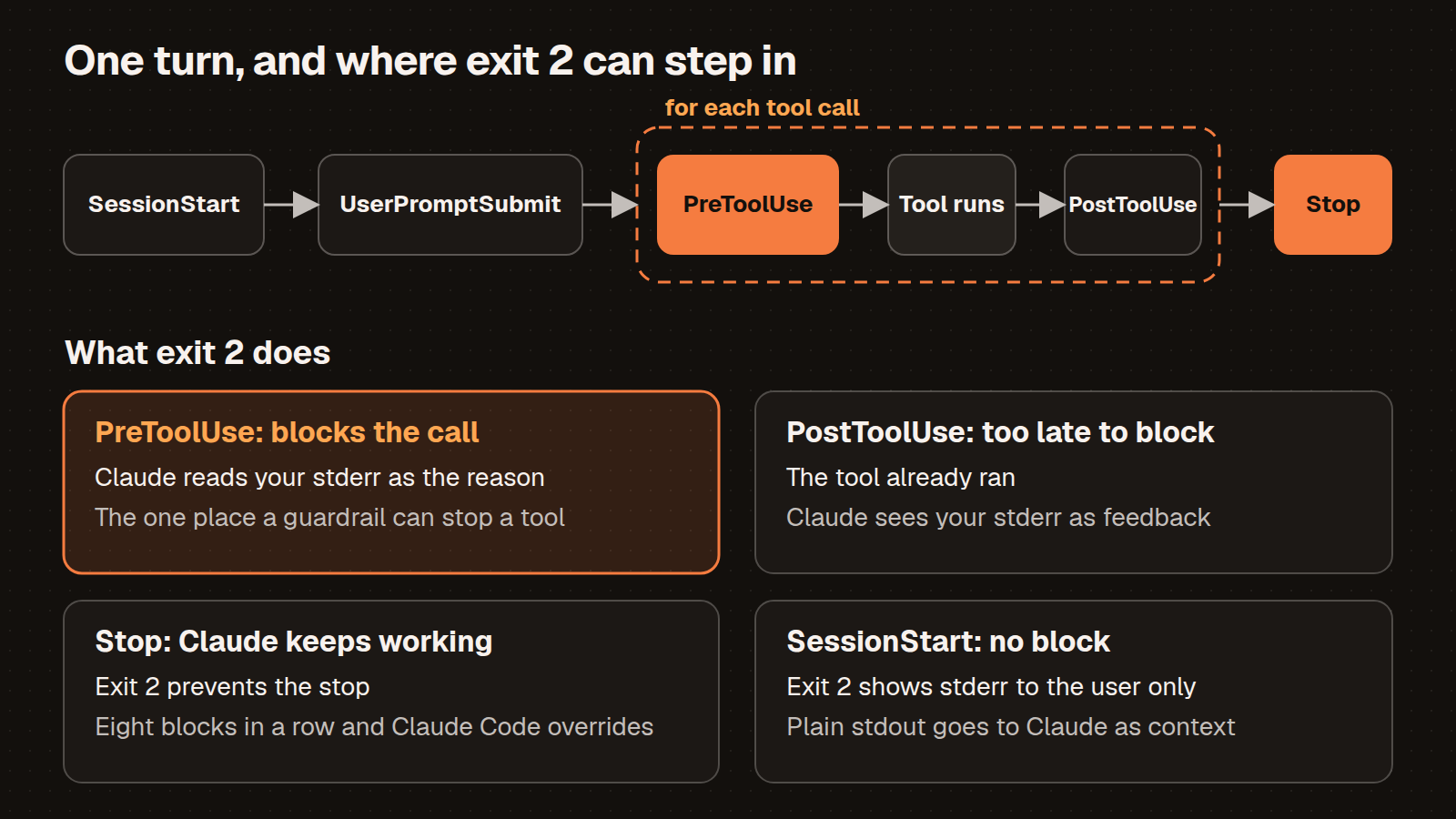
One turn, left to right, with the events this post uses. Exit 2 stops the action only on the events that can block. On PostToolUse the tool has already run.
Three things to check when you copy from any list. First, the count: one popular guide covers 12 events, and the reference lists far more. Second, whether exit 2 works on the event you picked: it is not honored on PermissionRequest, where you deny through a decision object instead, although one popular list marks that event as blockable. Third, the field names: the PostToolUse input carries the result in tool_response, while one popular sample shows tool_output. The reference is the source of truth.
A hook can be one of five types. Pick the cheapest one that can make the decision.
| Handler | What runs | Default timeout | Use it when |
|---|---|---|---|
command | A shell command or script. No model call | 600 seconds | A path check, a regex or an exit code can decide. Start here |
http | A POST of the event JSON to a URL | 600 seconds | A shared service handles audit or policy. A non-2xx answer is a non-blocking error |
mcp_tool | A tool on an MCP server you configured | 600 seconds | A scanner is already an MCP tool. It does not run at launch on SessionStart |
prompt | One model call that returns a decision | 30 seconds | The hook input alone is enough to judge |
agent | A subagent that reads files and runs tools, up to 50 turns | 60 seconds | The decision depends on the real state of the code. Experimental |
The timeouts, the 50-turn limit and the "experimental" label for agent hooks are from the hooks reference. Our rule of thumb: if you can write the rule as code, write it as code. A command hook runs a script, not a model call, and the docs warn that agent hooks are experimental and say to prefer command hooks for production workflows.
Guardrails 1 to 3: block rm -rf, protect .env, keep edits in the repo
These three run on PreToolUse, before the tool does anything. All of them need only Python 3, so there is no jq to install. They live in .claude/hooks/ and need chmod +x.
Guardrail 1: block rm -rf
Register it on the Bash tool.
{
  "matcher": "Bash",
  "hooks": [
    {
      "type": "command",
      "command": "${CLAUDE_PROJECT_DIR}/.claude/hooks/block-rm-rf.py",
      "args": [],
      "onFailure": "block"
    }
  ]
}.claude/hooks/block-rm-rf.py:
#!/usr/bin/env python3
"""PreToolUse (Bash): block recursive+force rm. Exit 2 = block, stderr goes to Claude."""
import json, re, shlex, sys

try:
    command = json.load(sys.stdin)["tool_input"]["command"]
except (ValueError, KeyError, TypeError):
    print("block-rm-rf: could not read the hook input", file=sys.stderr)
    sys.exit(2)  # fail closed: an unreadable input is not a pass

def risky(segment: str) -> bool:
    try:
        words = shlex.split(segment)
    except ValueError:
        return False
    while words and (words[0] in ("sudo", "command", "env") or "=" in words[0]):
        words.pop(0)
    if not words or words[0] != "rm":
        return False
    flags = [w for w in words[1:] if w.startswith("-")]
    long = {w for w in flags if w.startswith("--")}
    short = "".join(w[1:] for w in flags if not w.startswith("--"))
    recursive = "--recursive" in long or "r" in short or "R" in short
    force = "--force" in long or "f" in short
    return recursive and force

for segment in re.split(r"&&|\|\||[;|\n]", command):
    if risky(segment):
        print(f"Blocked: '{segment.strip()}' is a recursive force delete. "
              "Delete specific files, or ask the user to run it.", file=sys.stderr)
        sys.exit(2)
sys.exit(0)
Three choices in there are worth copying. The script splits a compound command, so cd src && rm -fr cache is caught. It reads flags rather than a literal rm -rf, so -r -f, -fr and --recursive --force count too. And an input it cannot read exits 2, not 1, for a reason the troubleshooting section explains.
We left off the if filter on purpose, so the script and not a filter decides what counts as an rm. "args": [] switches the hook to exec form, which spawns the script directly with no shell, so path placeholders never need quoting (added in 2.1.139).
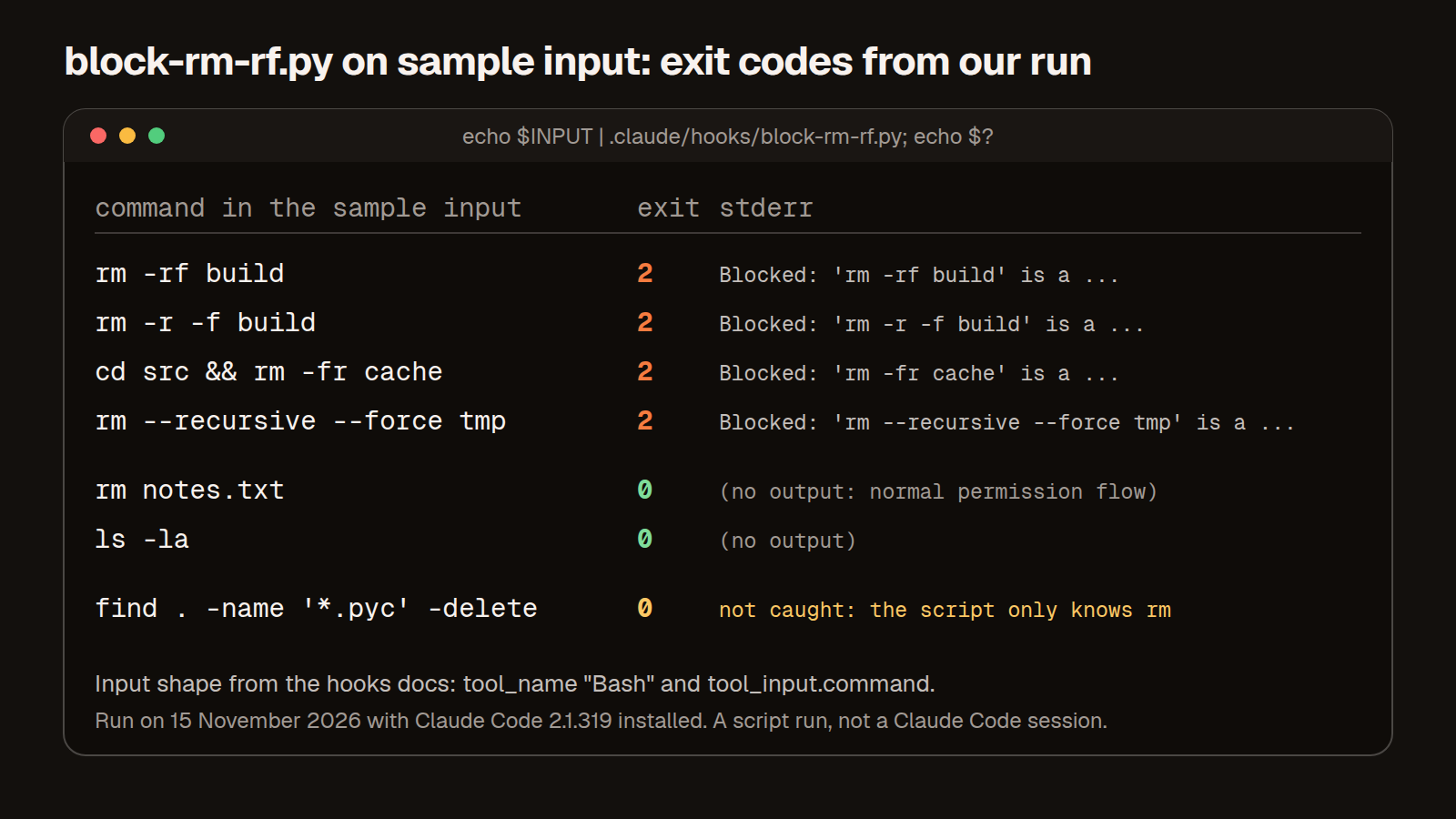
Our run of the script above with sample input, not a Claude Code session. The last line is the miss.
On our run all four spellings exited 2 with the message on stderr, and rm notes.txt and ls -la exited 0.
Exit 0 means "no decision", so the normal permission flow still applies: staying silent does not approve a call. The miss: find . -name '*.pyc' -delete also exited 0. A hook knows the spellings you taught it. For everything else, keep layers 1 and 2 from our file-safety setup: a copy outside the folder, and a smaller reach.
Guardrail 2: protect .env, lockfiles and .git
Register it on Edit and Write.
{
  "matcher": "Edit|Write",
  "hooks": [
    {
      "type": "command",
      "command": "${CLAUDE_PROJECT_DIR}/.claude/hooks/protect-files.py",
      "args": [],
      "onFailure": "block"
    }
  ]
}.claude/hooks/protect-files.py:
#!/usr/bin/env python3
"""PreToolUse (Edit|Write): protect secrets, lockfiles and .git. Exit 2 = block."""
import json, sys

try:
    path = json.load(sys.stdin)["tool_input"]["file_path"]
except (ValueError, KeyError, TypeError):
    print("protect-files: could not read the hook input", file=sys.stderr)
    sys.exit(2)

path = path.replace("\\", "/")          # Windows paths arrive with backslashes
parts = path.split("/")
name = parts[-1]

LOCKFILES = {"package-lock.json", "pnpm-lock.yaml", "yarn.lock", "uv.lock", "poetry.lock"}
is_env = name == ".env" or (name.startswith(".env.") and name != ".env.example")

if is_env or name in LOCKFILES or ".git" in parts[:-1]:
    print(f"Blocked: {path} is protected. Ask the user to change it.", file=sys.stderr)
    sys.exit(2)
sys.exit(0)
This is the shape of the protect-files.sh script in the hooks guide, rewritten to match file names and path segments instead of a substring. We ran both on the same inputs. Ours exited 2 for .env, .env.local, package-lock.json and .git/config, and exited 0 for .env.example, src/app.py and lib/.envelope.ts. The guide's script exited 2 for lib/.envelope.ts and for .env.example, because both contain the text .env.
Whether you want .env.example blocked is your call. The point is to know which one you installed.
What a PreToolUse hook on file tools cannot see matters more than the script:
- Shell commands. Claude can still change protected files with shell commands. The guide's fix is an
Editdeny rule per path inpermissions.deny, such asEdit(/.env), and sandboxing for the rest. @references. By default, files you reference with@in a prompt are inserted without a tool call, so noPreToolUsehook fires for them, including hooks matchingRead. AReaddeny rule blocks specific paths. SettingCLAUDE_CODE_DISABLE_FILE_MENTIONS=1(2.1.299 or later) turns the insertion off.- Windows paths. File paths arrive with backslashes, and a comparison written with forward slashes silently never matches. That is the reason for the
replaceline.
Guardrail 3: keep edits inside the repo
This one uses the other way to block: exit 0 and print a JSON decision. Choose one approach per hook. If you mix them, exit 2 keeps its blocking effect and the JSON fields cannot override it.
{
  "matcher": "Edit|Write",
  "hooks": [
    {
      "type": "command",
      "command": "${CLAUDE_PROJECT_DIR}/.claude/hooks/stay-in-repo.py",
      "args": [],
      "onFailure": "block"
    }
  ]
}.claude/hooks/stay-in-repo.py:
#!/usr/bin/env python3
"""PreToolUse (Edit|Write): deny writes outside the project, with a JSON decision."""
import json, os, sys

data = json.load(sys.stdin)
root = os.path.realpath(os.environ.get("CLAUDE_PROJECT_DIR") or data["cwd"])
target = os.path.realpath(data["tool_input"]["file_path"])   # resolves .. and symlinks

if target == root or target.startswith(root + os.sep):
    sys.exit(0)                                              # no decision: normal flow

json.dump({"hookSpecificOutput": {
    "hookEventName": "PreToolUse",
    "permissionDecision": "deny",
    "permissionDecisionReason": f"{target} is outside the project ({root}). Edit files inside the project only.",
}}, sys.stdout)
With deny, Claude Code cancels the call and feeds permissionDecisionReason back to Claude, so Claude can pick another path. On our run an edit under src/ printed nothing and exited 0. A ../outside/notes.md path, /etc/hosts and a file reached through a symlink inside the project that points outside it each printed the deny JSON.
Check one thing before you copy it. ${CLAUDE_PROJECT_DIR} stays at the project root where the session started, while the cwd in the input follows Claude into a worktree. If your worktrees live outside the project root, this script would deny them. Add their folder as a second allowed root.
Guardrail 4: ask before git push, deny force pushes
A hook can do more than block. PreToolUse supports four decisions: allow, deny, ask and defer. This guardrail denies force pushes and asks you about every other push. It uses the if field, which takes permission rule syntax, so the script only starts when the command matches.
{
  "matcher": "Bash",
  "hooks": [
    {
      "type": "command",
      "if": "Bash(git push *)",
      "command": "${CLAUDE_PROJECT_DIR}/.claude/hooks/git-push-guard.py",
      "args": []
    }
  ]
}.claude/hooks/git-push-guard.py:
#!/usr/bin/env python3
"""PreToolUse (Bash, only for `git push *`): deny force pushes, ask for the rest."""
import json, shlex, sys

command = json.load(sys.stdin)["tool_input"]["command"]
words = shlex.split(command)
forced = any(w in ("-f", "--force") or w.startswith("--force=") for w in words)

decision, reason = ("deny", "Force pushes are blocked. Use --force-with-lease after asking the user.") if forced \
    else ("ask", "Pushing publishes commits. Confirm the branch and remote first.")
json.dump({"hookSpecificOutput": {"hookEventName": "PreToolUse",
    "permissionDecision": decision, "permissionDecisionReason": reason}}, sys.stdout)
On our run git push origin feature/login and git push --force-with-lease origin feature/login printed an ask decision, and git push --force origin main and git push -f printed deny. The if filter checks each subcommand: the guide's table shows Bash(git *) matching npm test && git push, so a compound command that ends in a push still reaches the script. The same page calls the filter best-effort, so use permission rules, not a hook filter, when you need a hard allow or deny.
Two details bite people. The decision must sit inside hookSpecificOutput: a permissionDecision at the top level of the JSON parses fine and is ignored, with no error. And in a claude -p run nobody can answer an ask, so Claude Code denies the call and Claude reads your reason instead. If several hooks answer the same call, the most restrictive wins, in the order deny, defer, ask, allow.
Guardrails 5 to 7: format after edits, tests before done, rules after compaction
Guardrail 5: format every file Claude edits
On PostToolUse the tool has already run, so the hook cannot undo anything. It is the right place for work that should follow a successful edit. The hooks guide ships a Prettier version: f=$(jq -r '.tool_input.file_path') && npx prettier --write --ignore-unknown "$f". Here is a Python-project version, in .claude/hooks/format-edited.sh:
#!/bin/bash
# PostToolUse (Edit|Write): format the file Claude just wrote. Python files only.
f=$(jq -r '.tool_input.file_path // empty')
case "$f" in
  *.py) ruff format --quiet "$f" || true ;;   # a formatter error must not look like a block
esac
exit 0{
"matcher": "Edit|Write",
"hooks": [
{ "type": "command", "command": "${CLAUDE_PROJECT_DIR}/.claude/hooks/format-edited.sh", "args": [] }
]
}We fed it a messy src/messy.py (x = { "a":1, and a two-space-indented function). The hook exited 0 and the file came back as x = {"a": 1, "b": 2} with a correctly formatted function.
Then we gave ruff format a file with a syntax error. Without the guard, ruff exited 2, and on PostToolUse an exit 2 shows your stderr to Claude. That can be useful, but it should be your choice and not an accident of the formatter's exit codes. The || true makes it a choice.
One gap: this hook only fires when Claude uses the Edit or Write tools. A file a Bash command rewrites is not covered. Use a FileChanged hook for a specific file, or a Stop hook that scans the working tree once per turn.
Guardrail 6: run the tests before Claude says it is done
A Stop hook fires when Claude finishes responding, and exit 2 or decision: "block" keeps it working. The trap is the loop. The docs describe two protections. The input carries stop_hook_active, which is true when Claude is already continuing because of a stop hook. And Claude Code overrides a Stop hook after it blocks eight times in a row with no tool call from Claude in between.
The guide's pattern is to exit 0 whenever stop_hook_active is true. As we read it, that lets Claude stop after one failed attempt even if the tests still fail. We prefer a gate that keeps blocking while the tests fail and counts its own tries, so it gives up on purpose instead of by accident. .claude/hooks/stop-gate.py:
#!/usr/bin/env python3
"""Stop: keep Claude working while the tests fail, but give up after 3 blocks."""
import json, os, subprocess, sys, tempfile

data = json.load(sys.stdin)
counter = os.path.join(tempfile.gettempdir(), f"stop-gate-{data['session_id']}")
tries = int(open(counter).read()) if os.path.exists(counter) else 0

result = subprocess.run(os.environ.get("TEST_COMMAND", "python3 -m unittest -q").split(),
                        cwd=data["cwd"], capture_output=True, text=True)
if result.returncode == 0:
    if os.path.exists(counter):
        os.remove(counter)
    sys.exit(0)                                   # tests pass: let Claude stop

if tries >= 3:                                    # stop looping, tell the user
    json.dump({"systemMessage": "stop-gate: tests still fail after 3 tries; letting Claude stop."}, sys.stdout)
    sys.exit(0)

open(counter, "w").write(str(tries + 1))
tail = (result.stdout + result.stderr).strip().splitlines()[-15:]
json.dump({"decision": "block",
"reason": "Tests are failing. Fix them before you finish:\n" + "\n".join(tail)}, sys.stdout){
"hooks": [
{ "type": "command", "command": "${CLAUDE_PROJECT_DIR}/.claude/hooks/stop-gate.py", "args": [], "timeout": 120 }
]
}Put that handler under a Stop key with no matcher, since Stop has no matcher support. On our run, with a test that asserts 1 + 1 == 3, the first three Stop events printed a block decision with the last lines of the unittest output as the reason. The fourth printed the systemMessage and let Claude stop. After we fixed the test, the next event printed nothing and exited 0. The hook's reason tells Claude why it should continue, so passing the failing output along gives it something to act on.
If your suite is slow, "async": true runs a hook in the background, but async hooks cannot block or control Claude, so it suits reporting, not gating. If a gate legitimately needs more than eight rounds, raise CLAUDE_CODE_STOP_HOOK_BLOCK_CAP. Setting it to 0 disables the cap, which we would not do. If all you want is "keep going until this condition holds", the built-in /goal command is a session-scoped shortcut for a prompt-based Stop hook.
Guardrail 7: restore your rules after compaction
Compaction summarizes the conversation and can drop details. A SessionStart hook with the compact matcher puts the important ones back. Claude Code adds plain text your command writes to stdout to Claude's context.
{
  "matcher": "compact",
  "hooks": [
    {
      "type": "command",
      "command": "echo 'Reminder: run python3 -m unittest before you finish. Never edit .env. Current branch:' $(git branch --show-current)"
    }
  ]
}
Run in our scratch repo, the command printed Reminder: run python3 -m unittest before you finish. Never edit .env. Current branch: main and exited 0. Keep this for the few facts that change, such as the branch or the sprint. The docs say to put instructions that never change in CLAUDE.md, which loads without running a script.
Guardrail 8: when does a prompt or agent hook earn its cost?
Everything above is deterministic. Some rules are not: "did Claude finish everything the user asked?" has no regex. For those, a prompt hook sends your prompt and the hook's input to a Claude model, which must answer in JSON with ok and, when ok is false, a reason.
{
  "hooks": [
    {
      "type": "prompt",
      "prompt": "Check whether Claude finished everything the user asked and ran the tests. $ARGUMENTS\n\nRespond with JSON: {\"ok\": true} to allow stopping, or {\"ok\": false, \"reason\": \"what is still missing\"} to keep working.",
      "timeout": 30
    }
  ]
}
Put it under Stop. What ok: false does depends on the event, and the per-event list in the hooks reference is worth keeping open:
StopandSubagentStop: the reason becomes Claude's next instruction, unless the model also returns"impossible": true, which lets the turn end.PreToolUse: the call is denied, and by default the turn ends with a warning line. SetcontinueOnBlock: trueto return the reason to Claude as the tool error instead.PostToolUse: by default the turn ends with a warning line.continueOnBlock: truefeeds the reason back.
The cost is real because Stop hooks fire whenever Claude finishes responding, not only at the end of a task. Each of those is a model call, with a default timeout of 30 seconds and, unless you set model, the model Claude Code uses for background work.
An agent hook goes further: it can read files and run tests, up to 50 turns and 60 seconds by default. The docs label agent hooks experimental and say to prefer command hooks for production. We did not run either type, because both need a model call. So the order we follow is: a command hook when a command can answer, a prompt hook when the hook input is enough, an agent hook only when the answer lives in the code.
Why is your Claude Code hook not firing?
Work down this list in order. It follows the docs' own troubleshooting tables, and the first step needs no Claude Code at all.
# 1. Does the script work on its own? (the docs' own test recipe)
echo '{"tool_name":"Bash","tool_input":{"command":"rm -rf build"}}' | .claude/hooks/block-rm-rf.py
echo $?          # 2 means it blocks

# 2. Did Claude Code load it?  Inside a session, run:  /hooks

# 3. What ran, and for how long?
claude --debug-file /tmp/claude.log      # then: grep "Hooks:" /tmp/claude.log

# 4. A plugin's hooks file
claude plugin validate ./guardrails --strict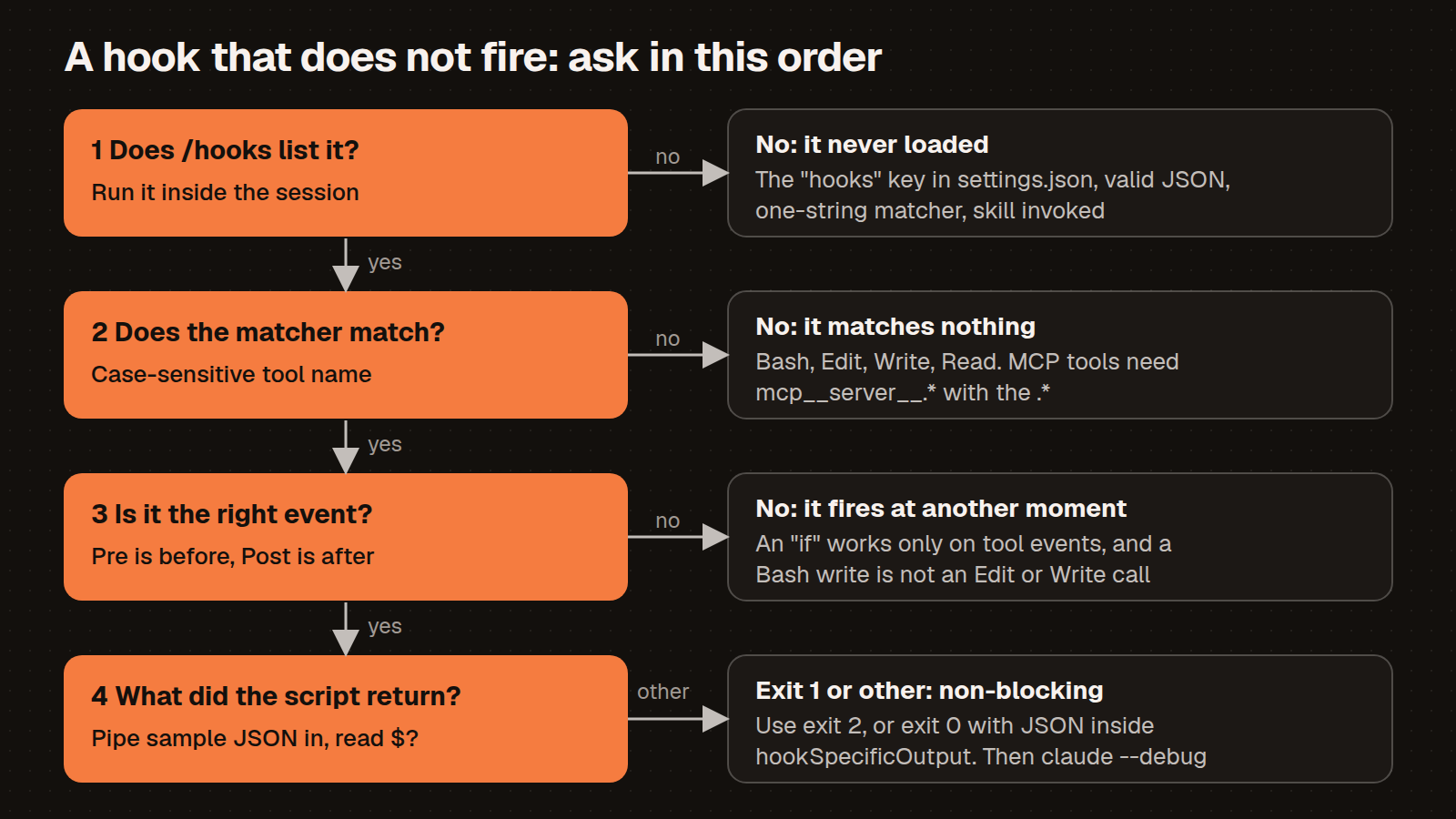
Start at the top. Each branch ends in the one check that settles it.
| What you see | Likely cause | What to do |
|---|---|---|
Not in /hooks | Hooks sit in a standalone file | Move them under the "hooks" key in settings.json. Only plugins load a separate hooks/hooks.json |
Not in /hooks | matcher is an array | Use one string with a pipe between tool names, as in guardrail 2. An array under PreToolUse or PermissionRequest stops that file's other hooks from loading too |
Not in /hooks | Hook is in a skill's frontmatter and the skill has not run | Invoke the skill, then run /hooks again |
Not in /hooks | ~/.claude.json instead of ~/.claude/settings.json | They are two files. Hooks belong in settings.json |
In /hooks, never fires | The matcher is lowercase or misspelled | Matching is case-sensitive: Bash, Edit, Write, Read. A misspelled tool name matches nothing, silently |
In /hooks, never fires | if on a non-tool event | if works only on tool events. On any other event the hook never runs |
In /hooks, never fires | Wrong event for the job | PreToolUse runs before the tool, PostToolUse after |
| Fires on everything | A matcher on an event with no matcher support | It is silently ignored, so the hook fires every time. Stop and UserPromptSubmit are two |
| Fires, nothing happens | Exit 1 or any other code than 0 or 2 | A non-blocking error. Use exit 2, or JSON with exit 0 |
| Fires, nothing happens | Decision field at the wrong level | permissionDecision goes inside hookSpecificOutput. Misplaced fields are ignored, with no error |
| Fires, nothing happens | Your shell profile echoes text before the JSON | Output that does not start with { is read as plain text. Echo only in interactive shells |
| Fires, the action still happens | PostToolUse or Notification | They cannot block: the tool already ran, or the exit code is ignored |
| Stop hook ends with a warning | Eight blocks in a row | Check stop_hook_active, or count tries as guardrail 6 does |
The rows come from the docs' troubleshooting tables and the debug-your-config page. Three more we saw ourselves.
A crash exits 1. We fed {} to a script that read tool_input.command with no check and got KeyError: 'tool_input' and exit code 1. Per the reference, exit 1 without valid JSON is a non-blocking error, "even though 1 is the conventional Unix failure code", so the command would have run. Our guardrail 1 exits 2 for the same input.
A missing script exits 127, and a script that is not executable exits 126. We ran both through sh -c, the way shell form runs a command on Linux. Both are non-blocking unless you set onFailure. The docs' advice for any policy hook is to watch for the error notice on its first run, because a mistyped path means the hook never runs. "onFailure": "block" (2.1.295 or later) turns a crash, a timeout or an unexpected exit code into a block.
A plugin's hooks file can hold a typo that is ignored. claude plugin validate catches this class of silent failure. When we lowercased PreToolUse to pretooluse, it printed hooks.pretooluse: unknown hook event; entry ignored at runtime. Without --strict it still exited 0. With --strict it exited 1, so use --strict in CI.
How do you share hooks with a team, and what is the security catch?
Where a hook lives decides who gets it.
| Location | Scope | Shared with the team |
|---|---|---|
~/.claude/settings.json | All your projects | No |
.claude/settings.json | One project | Yes, commit it |
.claude/settings.local.json | One project | No |
| Managed policy settings | The organization | Yes, set by an admin |
A plugin's hooks/hooks.json | Wherever the plugin is enabled | Yes |
| A skill's or subagent's frontmatter | After the skill runs, or while the subagent runs | Yes |
To package guardrails 1 and 2 as a plugin, put the scripts in scripts/ and reference them with ${CLAUDE_PLUGIN_ROOT}:
{
  "description": "Guardrails for destructive commands and protected files",
  "hooks": {
    "PreToolUse": [
      {
        "matcher": "Bash",
        "hooks": [
          {
            "type": "command",
            "command": "${CLAUDE_PLUGIN_ROOT}/scripts/block-rm-rf.py",
            "args": [],
            "onFailure": "block"
          }
        ]
      },
      {
        "matcher": "Edit|Write",
        "hooks": [
          {
            "type": "command",
            "command": "${CLAUDE_PLUGIN_ROOT}/scripts/protect-files.py",
            "args": [],
            "onFailure": "block"
          }
        ]
      }
    ]
  }
}
A hooks file wraps the event map in a top-level "hooks" key, and a file with only the event map fails to load. This file passed claude plugin validate --strict on our machine. Plugins that declare an engines range are a 2.1.323 feature, so plugin authors can now pin the Claude Code versions a plugin works with. Our 2.1.319 install warned that engines was an unknown field, which is what you would expect from an older client.
The security catch. Command hooks run with your full user permissions, so a hook is code you are choosing to run. Three consequences:
- Read before you install. Check Point Research reported that a hook in a repository's
.claude/settings.jsoncould run shell commands on every collaborator's machine when they work with the project. Check Point reported all of its findings patched before publication, and Anthropic added a warning dialog for projects with untrusted Claude Code configurations. The lesson that stays: a settings file in a repo is executable.Our guide to checking a skill before you install it covers the same habit for skills and plugins.
claude -pshows no trust dialog. Without--bare, a-psession runs the hooks in a project's.claude/settings.json, even in a folder you have never trusted. For a repository you did not write, review.claude/first, start with--bare, or pass--settings '{"disableAllHooks": true}'for that run. Our headless guide covers the rest of a locked-down-psetup.- Long hooks in
-pruns. Since 2.1.323, Claude Code sends a progress heartbeat every 30 seconds while hooks run long inclaude -pand SDK sessions. A host such as Claude Desktop then won't end the turn as hung, once the host includes that version.
If you would rather start from a hook someone has already published, the Skill Manifest catalog lists them in Explore, each with its source, its pinned revision and its license. Two examples, both from Claude Code Templates under the MIT license at revision 72e5f237f64d:
security/dangerous-command-blockerblocks catastrophic shell commands such asrm -rf /andmkfsand protects the.claude,.gitandnode_modulespaths. It is aPreToolUsehook onBashthat runs a Python script.security/env-file-protectiondenies writes to.envfiles with anifofWrite(.env*). Its matcher isWrite, so addEditif you want edits blocked too.
"Reviewed" in the catalog means a person, with AI help, checked the record against the file at that pinned commit. It does not mean the hook is safe or was tested. The install step on each record says the same thing as this section: read the script first.
FAQ
Where do Claude Code hooks go?
Under the "hooks" key in a settings file: .claude/settings.json for a project you share, .claude/settings.local.json for yourself, or ~/.claude/settings.json for every project. Plugins use hooks/hooks.json. Run /hooks to see what loaded.
What exit code blocks a Claude Code hook?
Exit 2, on events that can block, such as PreToolUse, UserPromptSubmit and Stop. Your stderr becomes the reason. Exit 0 means no objection. Any other code is a non-blocking error unless the hook sets onFailure: "block".
Do hooks run in bypass mode and in claude -p?
A PreToolUse deny holds in every permission mode, including bypassPermissions. In claude -p, hooks from the project's settings run without a trust dialog unless you start with --bare or turn them off for the run.
Can I turn hooks off?
Set "disableAllHooks": true in a settings file, or pass --settings '{"disableAllHooks": true}' for one run. There is no way to switch off one hook and keep it in the config. Hooks from managed policy settings keep running unless disableAllHooks is set at the managed level.
Should I use a hook or a deny rule?
Use a deny rule when a fixed pattern is enough, because the permission system is the hard allow and deny. Use a hook when the decision needs logic: a path check against the repo root, a force-push test, a test run. They stack: a hook cannot override a deny rule.
Pick one guardrail, pipe a dangerous input into it and read echo $? before you trust it. Then explore the catalog for reviewed hooks and build your Claude Code setup.
Sources
- code.claude.com/docs/en/hooks
- code.claude.com/docs/en/hooks-guide
- code.claude.com/docs/en/features-overview
- code.claude.com/docs/en/permissions
- code.claude.com/docs/en/changelog
- code.claude.com/docs/en/headless
- code.claude.com/docs/en/debug-your-config
- code.claude.com/docs/en/plugins-reference
- code.claude.com/docs/en/env-vars
- research.checkpoint.com/2026/rce-and-api-token-exfiltration-through-claude-code-project-files
- www.morphllm.com/claude-code-hooks-examples
- dev.to/lukaszfryc/claude-code-hooks-complete-guide-with-20-ready-to-use-examples-2026-dcg
- github.com/davila7/claude-code-templates/blob/72e5f237f64d70a102a0c6306a3e67ac6f9c0351/cli-tool/components/hooks/security/dangerous-command-blocker.json
- github.com/davila7/claude-code-templates/blob/72e5f237f64d70a102a0c6306a3e67ac6f9c0351/cli-tool/components/hooks/security/env-file-protection.json