TL;DR
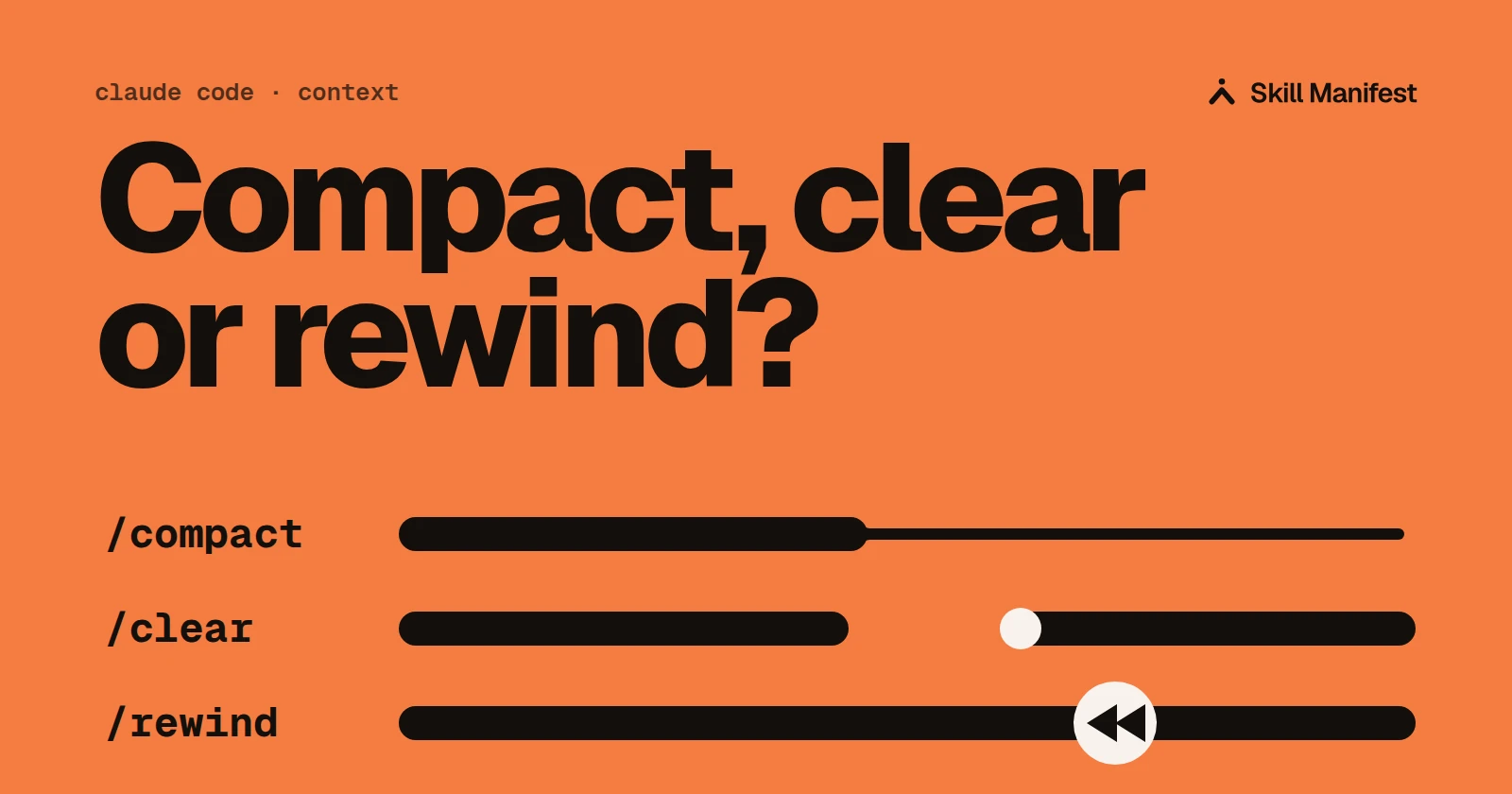
/clearstarts over,/compactcondenses./clearstarts a new conversation with empty context and saves the old one for/resume./compactkeeps the same conversation and replaces its history with a summary./rewindgoes back, not forward. It returns code, conversation or both to an earlier prompt, and the same menu can summarize just part of a session.- The cache sets the price.
/rewindlands on a prefix that is already cached./compactre-reads the history to write a summary, which is cheap while the cache is warm and costly after a long break, and then caches a new, shorter prefix. - Rule of thumb. New task:
/clear. Same task, long history:/compactwith a focus. Wrong turn:/rewind. A rule that must always hold goes in CLAUDE.md.
/clear ends the conversation, /compact condenses it, and /rewind takes it back to an earlier point. All three change what Claude sees on the next turn, and that is also what decides your bill.
Claude Code /compact vs /clear vs /rewind at a glance
/clear | /compact | /rewind | |
|---|---|---|---|
| What it does | Starts a new conversation with empty context | Replaces the history with a summary, same conversation | Returns code, conversation or both to an earlier prompt |
| The old conversation | Saved; /resume brings it back | Summarized; early detailed instructions may be lost | Turns after that prompt leave the conversation, unless you restore code only |
| CLAUDE.md | Reloaded, so mid-session edits apply | Re-injected from disk, mid-session edits apply | Unchanged |
| Next request and the cache | A new, short conversation; the docs say a clear costs nothing | The summary request reads the old prefix (cheap when warm, costly after a break); the next turn caches the shorter history | Hits the earlier cache entry |
| Use it when | You switch to unrelated work | Same task, long history, at a natural break | The last few turns went the wrong way |
This page follows Anthropic's docs and changelog as read on 15 November 2026 (release notes through 2.1.325). Where a behavior needs a minimum version, we name it.
What is in the context window, and what happens when it fills?
The context window holds everything Claude knows about your session: your instructions, the files it reads, its own responses, and content that never appears in your terminal. CLAUDE.md, auto memory, MCP tool names and skill descriptions load before you type anything; our guide to setup size covers that starting load. Every message makes a new API request that re-sends the full context, so a long session costs more per turn than a short one.
When the window nears its limit, Claude Code compacts automatically, so a full window does not end your session. Models with a native 1M window compact at about 967K tokens by default; Sonnet 4.6 and Opus 4.6 without extended context compact at the 200K boundary. To compact earlier, /autocompact 500k sets how full the window gets first, with sizes from 100K to 1M tokens. On 2.1.319, claude --help lists the same control as a launch flag, --autocompact <auto|tokens>.
With 1M windows you rarely run out of room, but you can still pay for context you don't need: a session that has collected three unrelated tasks re-reads all three on every turn of the fourth.
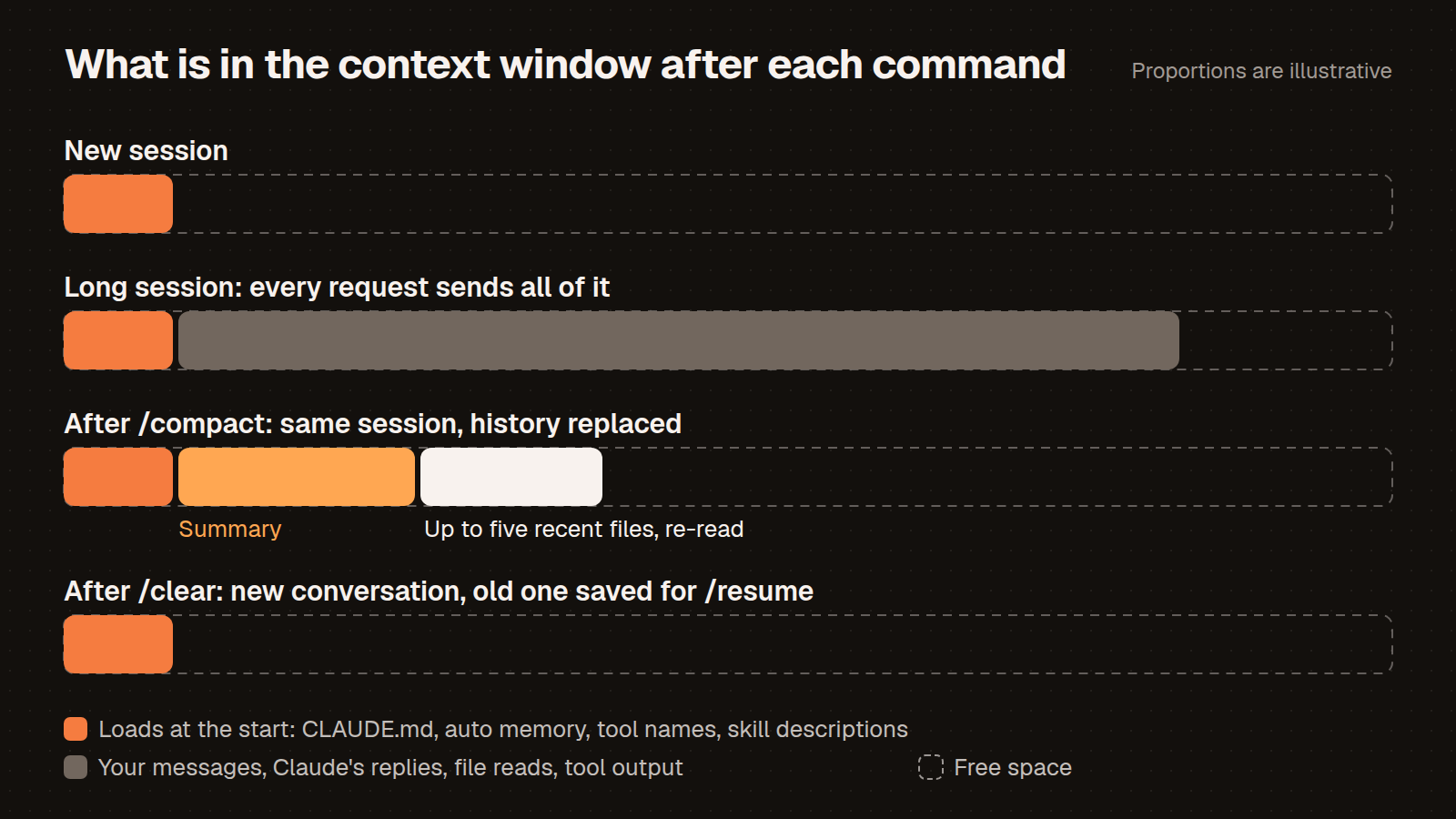
What stays in the window after each command. Sizes are illustrative; /context shows your real numbers.
What does /clear do?
/clear starts a new conversation with empty context. Its aliases are /reset and /new. The old conversation is not deleted: Claude Code saves the previous session, and /resume brings it back. Name it on the way out so you can find it: /clear release-prep labels the session you are leaving, or run /rename first.
What a clear changes:
- An active
/goalends. Running/clearalso removes any active goal; our/goalguide explains how goals end. - CLAUDE.md edits apply. Claude reads project-root and user-level CLAUDE.md once at session start. A mid-session edit waits for the next
/clear,/compactor restart. - The cost counter resets. Session totals start again at $0, and so does the
Prompt cache (main)line in/usage. - Background work survives. Since 2.1.319,
/clearno longer kills running commands of background agents, teammates and workflows that keep running.
Use it between unrelated tasks: old conversation crowds out the files you need next and costs tokens on every message. The second use is less obvious. If you have corrected the same thing twice and it is still wrong, a third correction mostly adds to a conversation that already contains two failed attempts. Run /clear and write one new prompt that folds in what you learned.
What does /compact keep, and what does it lose?
/compact frees up context by summarizing the conversation so far. The summary keeps your requests and key code snippets, but detailed instructions from early in the conversation may be lost. The context-window page lists what each part becomes after a compact:
| What | After /compact |
|---|---|
| System prompt and output style | Both still apply |
| Project-root CLAUDE.md, unscoped rules, auto memory | Re-injected from disk |
| Skill descriptions | Rebuilt and re-injected (2.1.304 or later) |
| Files Claude read or edited | Up to five re-read, most recently modified first; a file over 5,000 tokens comes back as a path reference |
| Invoked skill bodies | Re-injected, capped at 5,000 tokens each and 25,000 total; oldest dropped first |
| Background commands and background subagents | Keep running |
| Path-scoped rules and nested CLAUDE.md | Summarized away with the rest of the conversation |
| Context that hooks added earlier | Summarized with the rest of the conversation |
Two rows carry practical advice. A rule with paths: frontmatter lives in the conversation once it loads, so if it must persist across compaction, drop the paths: line or move the rule to the root CLAUDE.md. And a long skill is cut from the end, so put its important instructions near the top.
How do you steer what the summary keeps?
Pass a focus, such as /compact keep the plan, the changed files and the command that runs the tests. The summary then keeps what you choose instead of what the automatic pass guesses is important. For a standing preference, add a "Compact Instructions" section to CLAUDE.md. For text that must be back after every compaction, a SessionStart hook with a compact matcher re-injects whatever its command writes to stdout.
What are auto and idle compaction?
Auto-compaction is on by default. Turning it off with autoCompactEnabled keeps the manual command working but also turns idle compaction off, and a session on a 200K-boundary model then stops with the context-limit error instead of compacting. Idle compaction, added in 2.1.299, handles a long conversation you step away from. On the one-hour cache, once the context has reached 200,000 tokens by default and about an hour has passed, your next message sends a summary instead of the whole conversation. Set idleCompaction to false to stop it.
What does /rewind undo?
Claude Code automatically tracks Claude's file edits, with a checkpoint before each prompt that starts a turn. /rewind (alias /undo) opens the menu, and so does pressing Esc twice when the input is empty. Pick a prompt, then an action:
| Menu action | What it does |
|---|---|
| Restore code and conversation | Reverts both to that point |
| Restore conversation | Rewinds to that message and keeps current code |
| Restore code | Reverts file changes and keeps the conversation |
| Summarize from here | Compresses the conversation from this point forward |
| Summarize up to here | Compresses the conversation before this point and keeps later messages |
| Never mind | Returns to the list with no change |
The two code options appear only when that checkpoint has tracked file changes. A rewind takes the wrong turn out of the conversation, where a correction message leaves it there for Claude to re-read. The docs add that this makes it low-risk to try the bolder approach first and rewind if it doesn't work out.
The two Summarize actions are partial compacts, like a targeted /compact. They do not touch files, and the original messages stay in the session transcript. The docs' use case for "Summarize from here" is a verbose debugging session: compress it from the midpoint forward and keep your initial instructions intact. "Summarize up to here", added in 2.1.141, does the opposite: it compresses earlier context and keeps the recent turns.
What does a rewind not cover?
Checkpoints are session-level recovery, not history:
- Bash-only changes.
/rewindundoes Bash changes to a file Claude had already edited with its file tools, but a file that only Bash commands changed isn't tracked. Since 2.1.309,sed -iruns as a normal Bash command, so it is no longer restored either. - Subagents. For most subagents, rewinding restores only the files Claude had already edited in your conversation. A foreground forked skill is the exception.
- Outside edits and links. Manual edits and other sessions' edits are normally not captured, and symlinked or hard-linked files are skipped.
- Remote systems. Databases, APIs and deployments can't be checkpointed.
- Limits. Claude Code keeps snapshots for the 100 most recent checkpoints and by default deletes a session's snapshots about 30 days after it last saved one. Checkpoints survive
/resume.
For anything that needs history, use Git: for permanent version history, continue using version control. Rewind also reaches past a clear: since 2.1.191, if you ran /clear in the same process, the menu has a previous-session entry at the top. To try another direction and keep this conversation, /branch preserves the original for /resume.
How do /compact, /clear and /rewind affect the cache and your bill?
Prompt caching matches the start of each request exactly, so a change anywhere in the prefix recomputes everything after it. Claude Code orders a request in three layers: system prompt, project context (CLAUDE.md, auto memory, unscoped rules) and conversation. On a normal turn only the latest exchange is new, so most of each request reads from cache.
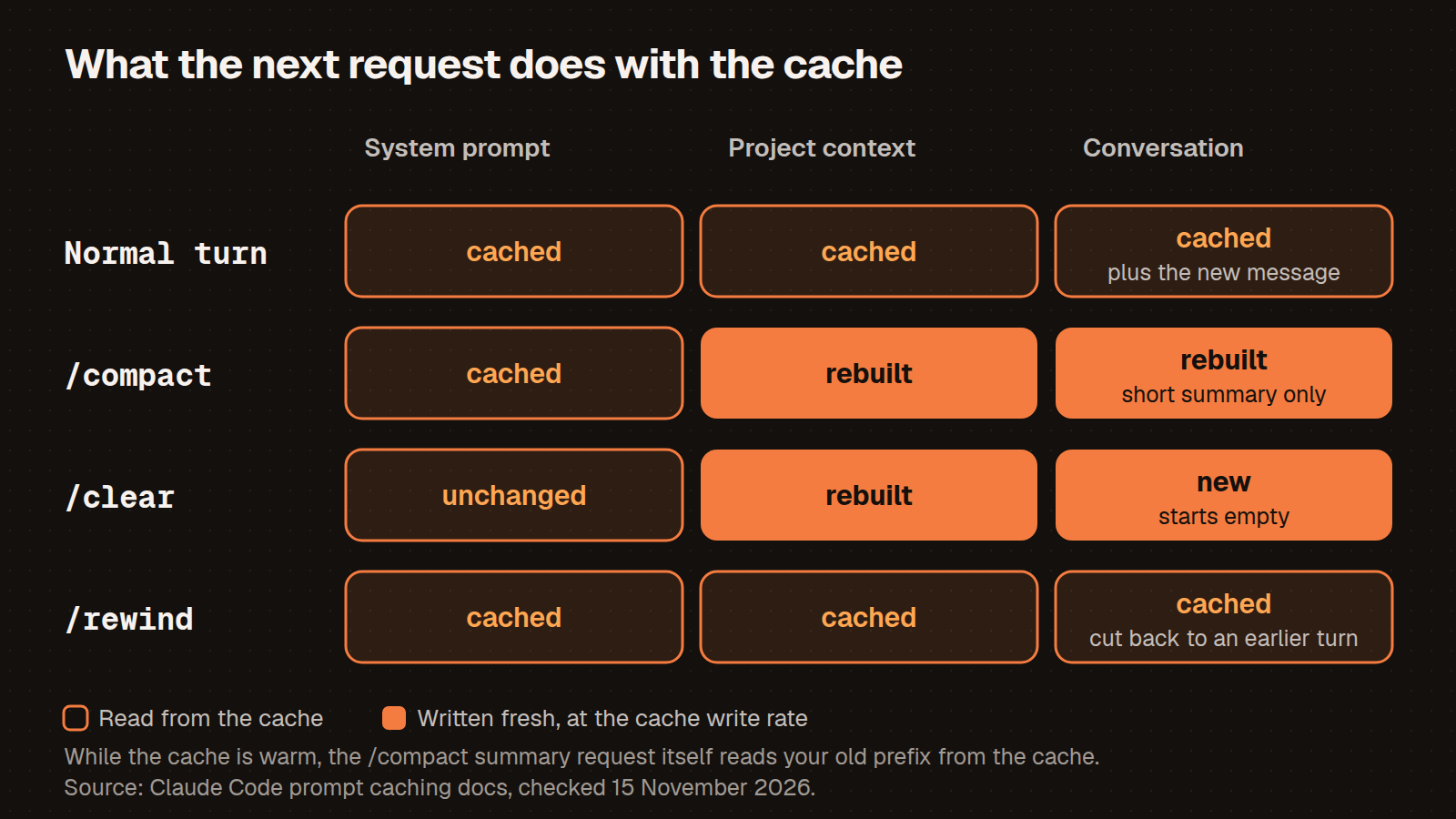
Outlined cells are read from the cache and solid cells are written fresh. The project-context layer changes at session start and after /clear or /compact; the system prompt changes when the set of tool definitions changes.
/rewind is the cheap one: the remaining history is what the cache was built from, so the next request hits the earlier cache entry, and restoring file checkpoints has no separate cache effect. /clear starts a short new conversation. /compact is the one that needs explaining.
Why a warm compact is cheap
One guide says compacting late means you've already spent tokens on a long, uncached conversation. In a session you have kept working in, the docs say otherwise. Compaction does invalidate the conversation layer, because the new history shares no prefix with the old one. But the request that writes the summary repeats your system prompt, tools and history, so while the cache is warm it reads your prefix from the cache and costs a fraction of what the context size suggests.
The Claude Code team explains the design: a separate summarization call with its own system prompt would make the prefixes diverge at the very first token and none of the cache applies. The next turn then rebuilds the conversation cache for only the much shorter history, and the project-context layer with it.
The costly case is a compact after the cache expired. The cache lasts about an hour on a subscription and five minutes on an API key, a cloud provider or usage credits, which is why /compact costs the most when you resume an old session.
What does a cold compact cost?
These are API list prices. On a subscription you spend plan usage instead, and the dollar figure in /usage isn't relevant for billing. The pricing page prices Opus 5.5 input at $4 per million tokens. A five-minute cache write is 1.25x that, a one-hour write 2x, and a cache read 0.05x on Opus 5.5 and Sonnet 5.5 (0.1x on most other models). By our arithmetic, 200,000 tokens of history on Opus 5.5 cost:
| 200,000 tokens on Opus 5.5 | Our arithmetic |
|---|---|
| Read from a warm cache (0.05x) | $0.04 |
| Uncached input (base price) | $0.80 |
| Written to a five-minute cache (1.25x) | $1.00 |
| Written to a one-hour cache (2x) | $1.60 |
So, by our arithmetic, a cold compact pays 20 times the warm read price for that history at the base rate, and 25 times if it is also written to a five-minute cache. The "12.5x" cold-start figure in one cost write-up is the same write-to-read comparison at the older 0.1x read rate (1.25 divided by 0.1, at Opus 4.6 prices).
Three habits follow:
- Compact at a natural break, such as between tasks, instead of waiting for auto-compaction to trigger mid-task.
- Rewind to abandon a path. Rewinding truncates back to a prefix that is already cached, instead of building a new one as compaction does.
- Plan for breaks. On a subscription's one-hour cache, a session past 200,000 tokens can be compacted while idle, shortly before the cache expires, if auto-compaction is on and your machine stays awake. A smaller session is not, and your first message after the hour reprocesses it. On an API key the cache lasts five minutes unless you set
promptCacheTtlto1h, and your first message after a longer break reprocesses your full context. If you do not need the history,/clearbefore you go.
How do you read your own hit ratio?
Run /usage. After the main conversation's first response, a Prompt cache (main) line in the Session block shows the hit ratio, the miss count and whether the cache is warm (2.1.251 or later). A high read-to-creation ratio means caching works; if creation stays high turn after turn, something is changing in your prefix. A compaction does not count against you: Claude Code reports it as an expected rebuild instead of a miss. The line covers the main conversation only. Subagents send their own requests on top of yours, a cost our background agents post covers.
Claude Code /compact vs /clear: which should you use?
Start from the situation, not the command.
| Situation | Use | Why |
|---|---|---|
| Switching to unrelated work | /clear (name it first) | Old history crowds out what you need next and is re-sent every turn |
| Same task, long history, at a natural break | /compact with a focus | You keep the thread, and the summary keeps what you chose |
| The last few turns went the wrong way | /rewind to the prompt before it | The next request hits the earlier cache entry |
| Early instructions matter, recent output is noise | /rewind, then Summarize from here | Keeps your starting prompts intact |
| Old context is stale, recent work matters | /rewind, then Summarize up to here | Compresses the earlier part, keeps later messages |
| You want to try another approach and keep this one | /branch | The original stays available through /resume |
| Stepping away, subscription, 200K+ tokens | Nothing | On the one-hour cache, idle compaction can run before it expires |
| Stepping away, API key, five-minute cache | /clear if you don't need the history | Otherwise your first message back reprocesses the full context |
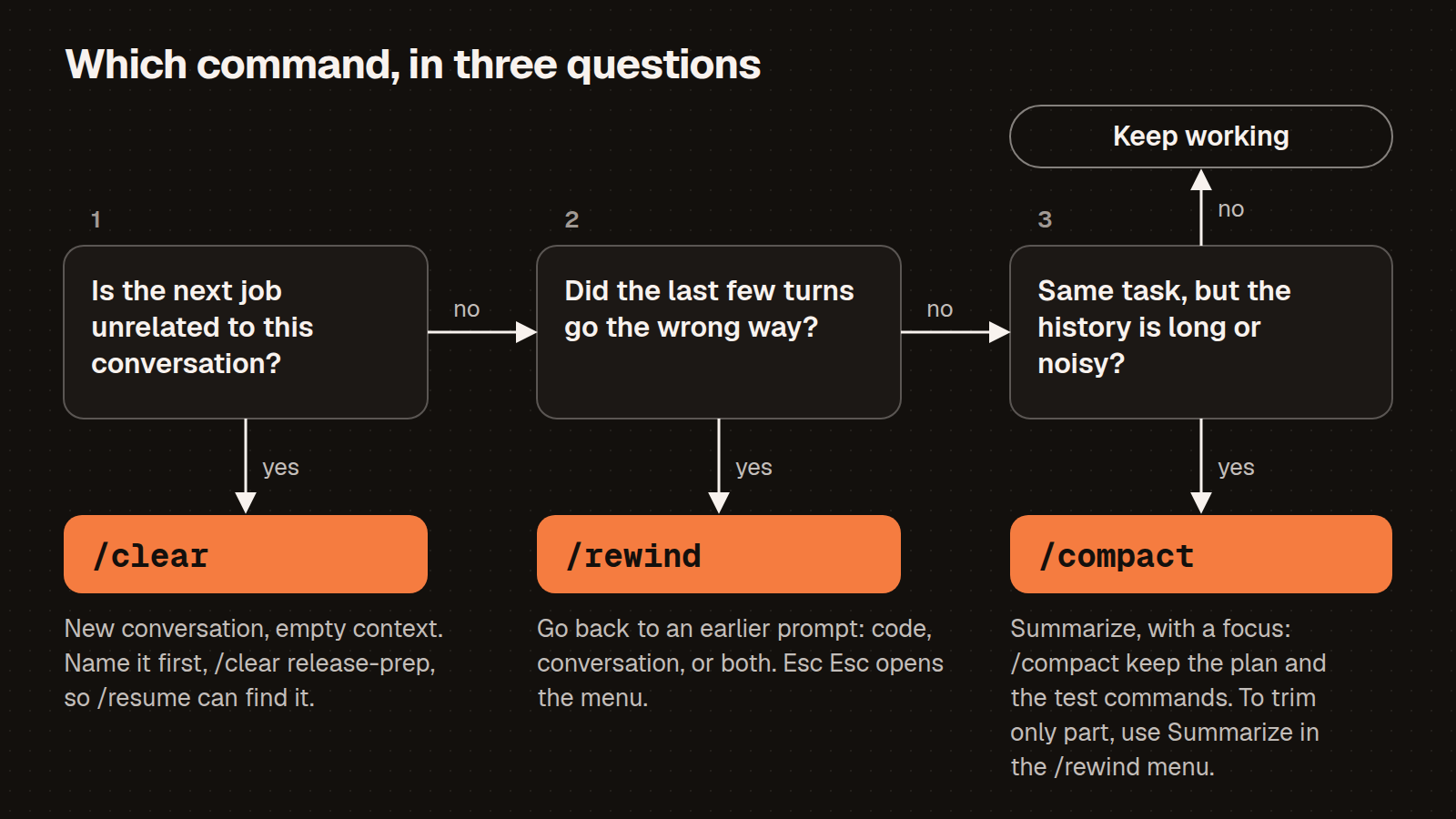
Three questions, in this order. The first yes decides.
Exercise: compare /context before and after a compact
Do this in a session you have already worked in for a while. It takes five minutes, and the numbers are yours.
- Run
/contextand note theMessagesrow and the rows above it. The troubleshooting guide reads them this way: ifMessagesis the largest row, a file or tool output is refilling the window; if the other rows together are larger, what loads at session start leaves too little room. - Run
/usageand copy thePrompt cache (main)line. - Run
/compact keep the plan, the changed files and the next command to run. - Run
/contextagain. TheMessagesrow should drop, because the history is now a summary. Our prediction, which this step lets you check: the rows above it stay close to where they were, since startup content is re-injected. - Send one short message, then run
/usageagain. Our prediction: the line gains an expected-rebuild count, a part that appears only after at least one expected rebuild. - Read the summary Claude wrote. If it dropped something you needed, that detail belongs in CLAUDE.md or a
SessionStarthook, not in the conversation.
If the startup rows are the big ones, /compact is the wrong tool and trimming your setup is the right one. The free Learn lesson on what loads when maps those rows.
FAQ
Does /clear delete my conversation?
No. Claude Code saves the previous session, and /resume brings it back. In the same process, the rewind menu also shows a previous-session entry at the top.
Is /compact expensive?
It is a request that reads your whole conversation. While the cache is warm that read comes from the cache; after the cache has expired it costs the most.
Does /rewind undo what a Bash command did?
Only for files Claude had already edited with its file tools. A file that only a Bash command changed stays as it is, so use Git. Changes to remote systems can't be checkpointed at all.
Sources
- code.claude.com/docs/en/context-window
- code.claude.com/docs/en/prompt-caching
- code.claude.com/docs/en/checkpointing
- code.claude.com/docs/en/costs
- code.claude.com/docs/en/sessions
- code.claude.com/docs/en/commands
- code.claude.com/docs/en/model-config
- code.claude.com/docs/en/best-practices
- code.claude.com/docs/en/how-claude-code-works
- code.claude.com/docs/en/goal
- code.claude.com/docs/en/hooks-guide
- code.claude.com/docs/en/settings-reference
- code.claude.com/docs/en/troubleshooting
- code.claude.com/docs/en/interactive-mode
- code.claude.com/docs/en/changelog
- claude.com/blog/lessons-from-building-claude-code-prompt-caching-is-everything
- platform.claude.com/docs/en/about-claude/pricing
- www.mindstudio.ai/blog/prompt-caching-claude-code-save-tokens
- www.zivtech.com/blog/economics-of-claude-code-part-1-session-timing
- skillmanifest.co/learn/context