TL;DR
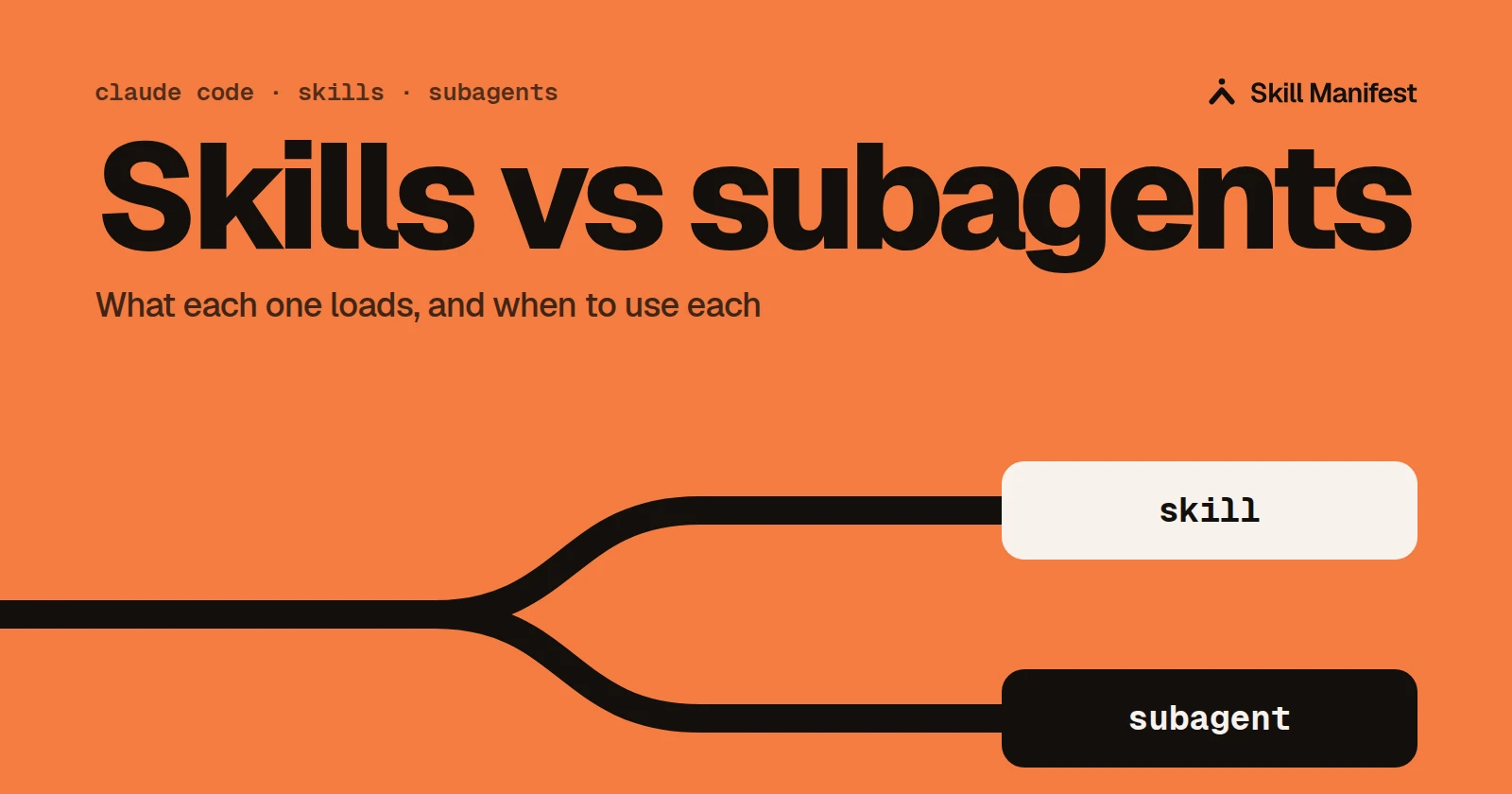
- Claude Code skills vs subagents: the choice is where the in-between work lives. A skill's body lands in the conversation you are in. A subagent reads and searches in a separate window and sends back a summary.
- Match the job to where its work should live. Reference material and procedures you want to watch: a skill. Heavy reading, noisy output or a second opinion: a subagent. A rule that must hold every time: a hook.
- They combine in two directions.
context: forkmakes a skill the task of a subagent. Theskills:field loads skill bodies into a subagent at startup. Typos in either field fail silently. - A subagent knows your project, not your conversation. It starts with its own prompt, your CLAUDE.md and git status (Explore and Plan skip both), any preloaded skills, and the task Claude writes. When one subagent is too small, the docs point to dynamic workflows.
Claude Code skills vs subagents: what is the one-line difference?
The docs put it in two lines: skills are reusable content you can load into any context, and subagents are isolated workers that run separately from your main conversation. Comparison pages say the same in other words: DEV's table has a skill sharing your main chat context and a subagent getting its own window. Chipp's is the sharpest one we read: "Skills are knowledge the agent reads while it's working. Sub-agents are work the agent delegates to a separate instance."
It is correct, and it stops where the choice gets interesting. Three facts the slogan hides:
- A skill can run in a subagent. Add
context: forkand the skill becomes the subagent's task. - A subagent can carry skills. The
skills:field injects full skill bodies at startup. - A subagent is not a blank slate. It loads your CLAUDE.md and a git status snapshot, so it knows your project but not your conversation.
The docs' comparison table is worth keeping in view. This one is adapted from it.
| Aspect | Skill | Subagent |
|---|---|---|
| What it is | Reusable instructions, knowledge, or workflows | Isolated worker with its own context |
| Context window | Adds to your main window | Uses a separate window with its own input and output tokens |
| Key benefit | Share content across contexts | Context isolation: work happens separately, only a summary returns |
| Best for | Reference material, invocable workflows | Tasks that read many files, parallel work, specialized workers |
The question that settles most cases is where the in-between work should live. In your conversation, where you can read and steer it: a skill. In a separate window, with only the result returning: a subagent.
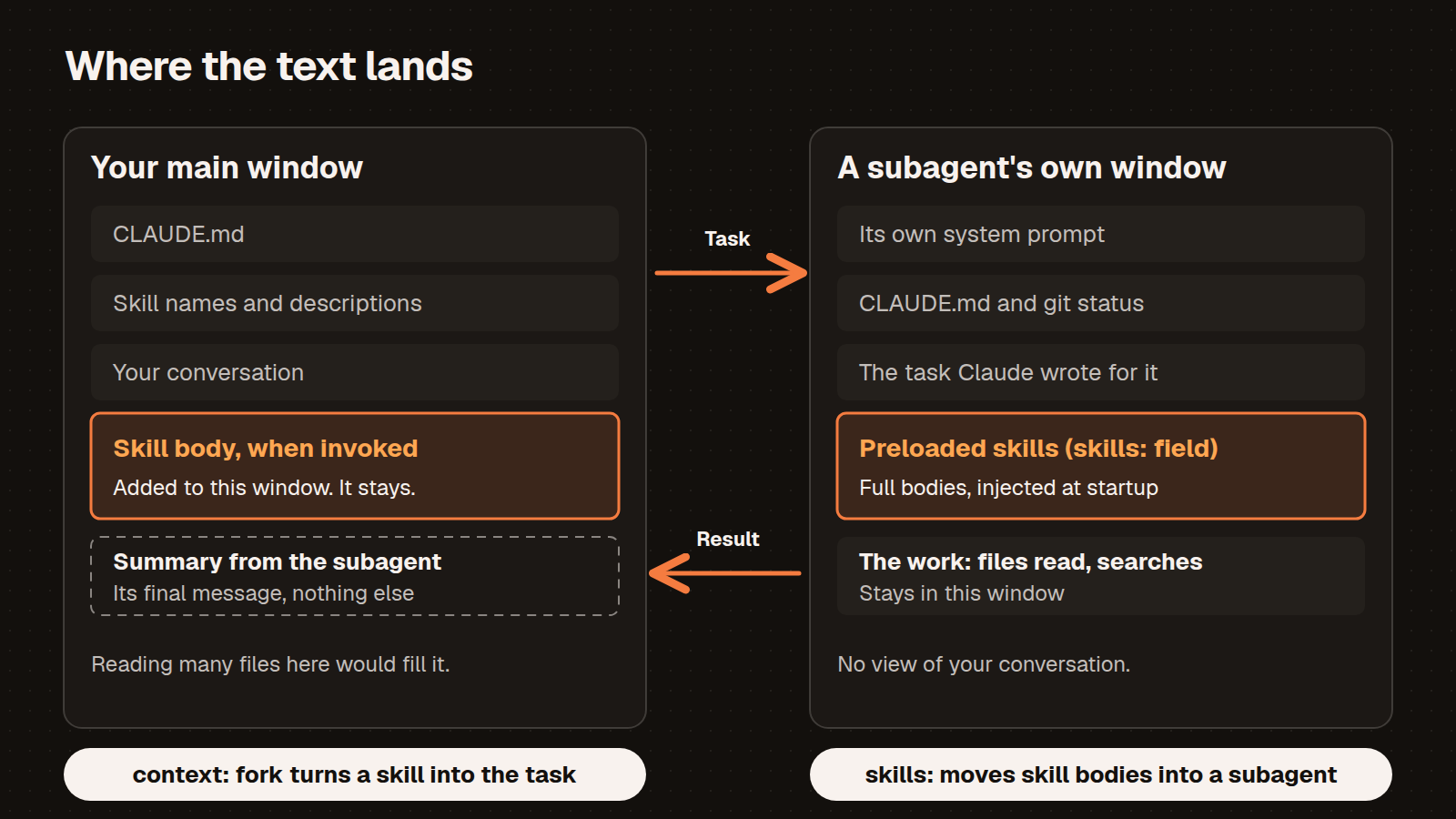
A skill's body lands in your window and stays. A subagent's work stays in its window. context: fork and skills: are the two bridges.
What does a skill load, and when?
By default a skill costs you in two steps. Its name and description sit in Claude's context on every request. Its body loads when you type /name or Claude matches the description to your task. Once loaded, the rendered SKILL.md enters the conversation as a single message and stays there across later turns. Claude Code does not re-read the file, so write standing instructions ("run the tests after every edit"), not one-time steps.
Three numbers matter if you keep many skills:
- The listing has a budget. It scales at 1% of the model's context window. When it overflows, Claude Code drops descriptions, starting with the skills you invoke least.
- Each entry is capped. Description and
when_to_usetogether are cut at 1,536 characters, so put the key use case first. - Compaction trims invoked skills. After auto-compaction, Claude Code re-attaches the most recent invocation of each skill, keeping the first 5,000 tokens of each, within a 25,000-token total. Put the instructions that matter most at the top.
Two frontmatter fields decide who can start a skill, and they change what loads:
| Frontmatter | You can invoke | Claude can invoke | In context |
|---|---|---|---|
| (default) | Yes | Yes | Description always, body when invoked |
disable-model-invocation: true | Yes | Not on its own | No description, body when invoked |
user-invocable: false | No | Yes | Description always, body when invoked |
One side effect to know now: a skill with disable-model-invocation: true cannot be preloaded into a subagent, because preloading draws from the same set Claude can invoke. For how much a whole setup weighs, see what each skill, rule and MCP server costs in context.
What does a subagent start with, and what comes back?
Each subagent starts with a fresh, isolated context window. A custom subagent begins with five things:
- Its own system prompt, plus environment details. Not the Claude Code system prompt.
- The task, which is the delegation message Claude writes.
- Your CLAUDE.md files, at every level the main conversation loads, including any
AGENTS.mdloaded as project instructions. - A git status snapshot of your repository.
- Preloaded skills, in full, from its
skills:field.
The built-in Explore and Plan agents start without CLAUDE.md and git status to stay fast and cheap. For your own subagents, omitClaudeMd: true (v2.1.271 or later) drops the user, project and local CLAUDE.md files. What never arrives: your conversation, the skills you already invoked and the files Claude already read. So if a subagent must follow a rule, such as ignoring a vendor/ folder, restate it in the prompt Claude uses to delegate.
A caution on the startup cost. The docs say your auto memory is not loaded into a non-fork subagent. One user's report on GitHub says otherwise: the first request of a do-nothing custom subagent carried the project's MEMORY.md and a skill listing. It measured 27,832 tokens with an 8-tool allowlist and 33,244 without one, against 45,907 for the built-in general-purpose agent, in a project with about 49 skills. A second commenter saw the same on v2.1.281.
We have not reproduced it, so treat it as a reason to measure your own, not as a constant.
What comes back. The summary and a small metadata trailer, nothing else. Claude Code also scans each report for text that imitates its own system tags before Claude reads it. A subagent Claude spawns from your main conversation starts in the background by default, uses a smaller tool set than a foreground one, and surfaces its permission prompts in your main session.
When the subagent needs your conversation, fork instead. /subtask <task> starts a fork, a subagent that inherits the whole conversation. Its first request reuses the parent's prompt cache, so the docs say it costs less than a fresh subagent for tasks that need the same context. Plain /fork is different: it copies the session into a new background session.
When to stay in the main conversation. The docs list frequent back-and-forth, phases that share context, quick targeted changes and latency. Anthropic's own guide says for a quick fix the overhead of delegation outweighs the benefit, and calls exploring ten or more files, or three or more independent pieces of work, a strong signal to use subagents.
Which one for a style guide, an audit, a review and a deploy checklist?
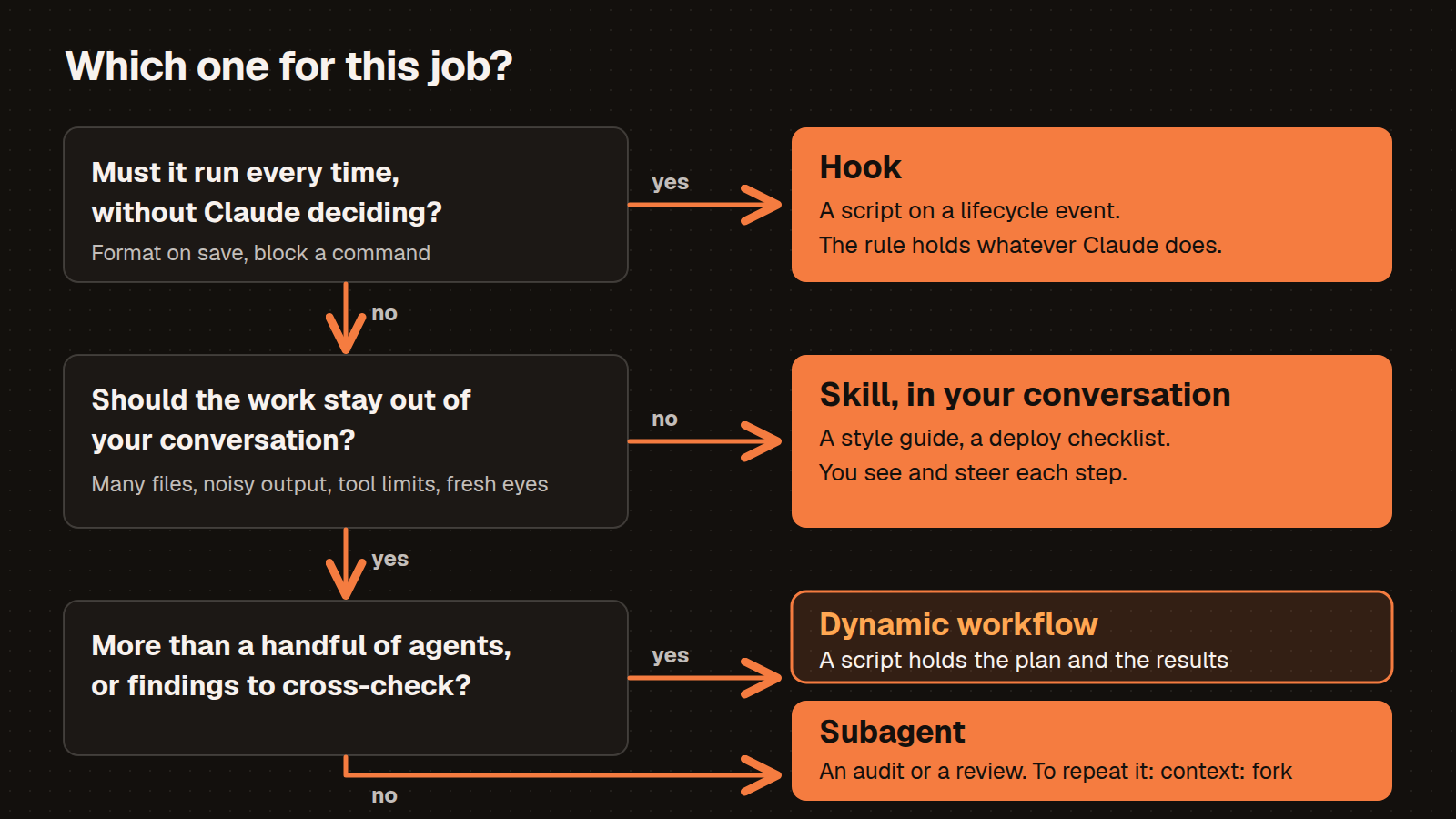
Three questions, in this order. The first sends guardrails to hooks, the second separates skills from subagents, the third sends large jobs to workflows.
We wrote the four files below in a scratch folder and ran claude plugin validate on them with Claude Code 2.1.319. It exited 0 and ended with Validation passed, after two notes about the plugin directory (no README, no LICENSE) that do not change the result. Its help says it validates "the skills, agents, and commands in a directory". That is a file check. It does not show Claude choosing them well, which needs a live session we did not run for this post.
| Job | Use | Why |
|---|---|---|
| Style guide | Reference skill | Needed while Claude writes code, short, loads when relevant |
| Codebase audit | Forked skill on Explore, or a subagent | Reads many files, only the findings matter |
| Review | Custom read-only subagent | Fresh eyes and a tool limit |
| Deploy checklist | Skill only you can call | Side effects, and you want to watch each step |
A style guide: a reference skill
Reference content runs inline so Claude can use it alongside your conversation. A subagent would be the wrong place, because it does not see what you are writing. If every session needs the rules, put them in CLAUDE.md instead. If only some tasks do, use a skill.
---
name: api-style
description: Our REST API conventions: naming, error format, pagination. Use when writing or reviewing endpoint code.
---

When you write or change an endpoint:

- Name resources in the plural: `/orders`, not `/order`.
- Return errors as `{"error": {"code": "...", "message": "..."}}`.
- Paginate every list with `limit` and `cursor`.
A codebase audit: a subagent
This is Chipp's "skill used as a sub-agent" mistake: a skill that says "check the database" loads instructions, then your main agent runs the queries and its window fills with raw rows. The fix is a subagent. If you want a command for it, a skill with context: fork gives you both. The skill content becomes the task, and agent: Explore supplies read-only tools.
---
name: audit-deps
description: Audit the project's dependencies for unused or outdated packages
context: fork
agent: Explore
disable-model-invocation: true
---

Audit the dependencies of this project:

1. List every dependency in the manifest files.
2. Search the source for imports of each one.
3. Report packages with no imports, with the file you checked.
Return a table: package, imported (yes/no), evidence.
Explore starts without your CLAUDE.md, so everything the task needs must be in the skill. We set disable-model-invocation: true so the audit runs when you type /audit-deps, not when Claude guesses.
A review: a subagent with a skill loaded
A reviewer gains from not sharing your assumptions. Anthropic's guide lists a fresh perspective as a reason to delegate, because the subagent does not inherit the primary conversation's blind spots. Leave out Edit and Write, and tell it to use Bash only to read. Then preload the conventions, so it knows them without discovering them.
---
name: code-reviewer
description: Reviews a diff for bugs and convention breaks. Use after a change is written.
tools: Read, Grep, Glob, Bash
model: sonnet
skills:
  - api-style
---

You review code. Read the diff with `git diff`, check it against the preloaded
API conventions, and report only real problems, each with file and line.
Use Bash only for read-only commands such as `git diff`. Do not edit any file.
Our own project does this a little differently. Its CLAUDE.md says to run the verify-and-review skill before calling anything done and, for architectural changes, to ask the slice-reviewer subagent. That subagent's file is 1,813 bytes, read-only, and tells it to read three of our skills by path. For more on reviewers, see how to set up Claude Code review like a team would.
A deploy checklist: a skill only you can call
A deploy has side effects, and you don't want Claude deciding to deploy because your code looks ready. Add disable-model-invocation: true.
---
name: deploy
description: Deploy the app to staging or production
disable-model-invocation: true
argument-hint: "[staging|production]"
---

Deploy $ARGUMENTS:

1. Run the test suite. Stop if anything fails.
2. Build the app.
3. Push the build to the target.
4. Check the health endpoint and report the status code.
The docs' own example of a deploy skill also sets context: fork. We would not fork it. Anthropic's blog on steering Claude Code says to use a skill when you want the procedure to play out inside the main thread so you can see and steer each step. A forked skill runs in the background by default, with a narrower tool set. If you do fork it, set background: false.
And if a step must hold every time, such as never deploying with failing tests, a checklist is only a request. A hook is enforcement.
How do you combine skills and subagents?
There are two directions, and the docs lay them out side by side.
| Approach | System prompt | Task | Also loads |
|---|---|---|---|
Skill with context: fork | From the agent type | The SKILL.md content | CLAUDE.md, per the agent's startup context |
Subagent with skills: | The subagent's markdown body | Claude's delegation message | Preloaded skills and CLAUDE.md |
In both, the subagent starts without your conversation history. Rules that save time:
- A forked skill needs a task. A skill that only says "use these API conventions" gives the subagent guidelines but no prompt, and it returns without meaningful output.
context: forkdoes not fork the conversation. Despite the name, it does not run in a fork of your conversation: the subagent gets the skill as its task, not your history. When the task depends on what you discussed, use/subtask.- Forked skills run in the background. That has been the default since v2.1.218, with
background: falseto wait. Claude Code also waits inclaude -p. Expect a row for it below the prompt and in/tasks. - Preloading has limits. Up to 32 distinct names (v2.1.295 or later), and none with
disable-model-invocation: true. A subagent can still invoke unlisted skills through the Skill tool, so omitSkillfrom itstoolsif you want to stop that. - Hooks travel with either one. Hooks in a skill's frontmatter register when the skill is invoked and last for the rest of the session. Hooks in a subagent run only while it runs.
- A skill can also start subagents without any field. The docs' example: an
/auditskill that kicks off security, performance and style subagents.
Misspelled fields fail silently. The docs say Claude Code ignores a field it doesn't recognize without reporting an error. We checked what the local tools say. We changed our files to contex: fork, and in the subagent skill: for skills: and allowed-tools: for tools:. Then we ran claude plugin validate, claude plugin validate --strict and claude doctor on version 2.1.319. All three exited 0, and none named any of the three fields.
For subagents, the docs point to a debug log: run claude --debug and search ~/.claude/debug/<session-id>.txt for does not recognize or apply (v2.1.296 or later). We did not run that, since it needs a session. Trust behavior over a green check: invoke the skill and look for the background row.
Setups you build in Skill Manifest's Build get a check on this pair. Our setup check reports an error when a skill has an agent field without context: fork, and a warning when the named agent is neither in the setup nor built in. You can download a setup as Markdown or a ZIP, and the export adds the agent file a forked skill names, such as .claude/agents/custom-researcher.md in our test. A test covers that case. To see how others wrote reviewer subagents and reference skills, browse the skills and agents in Explore.
When is one subagent too small?
Two options sit above a subagent. The docs' table shows who holds the plan in each.
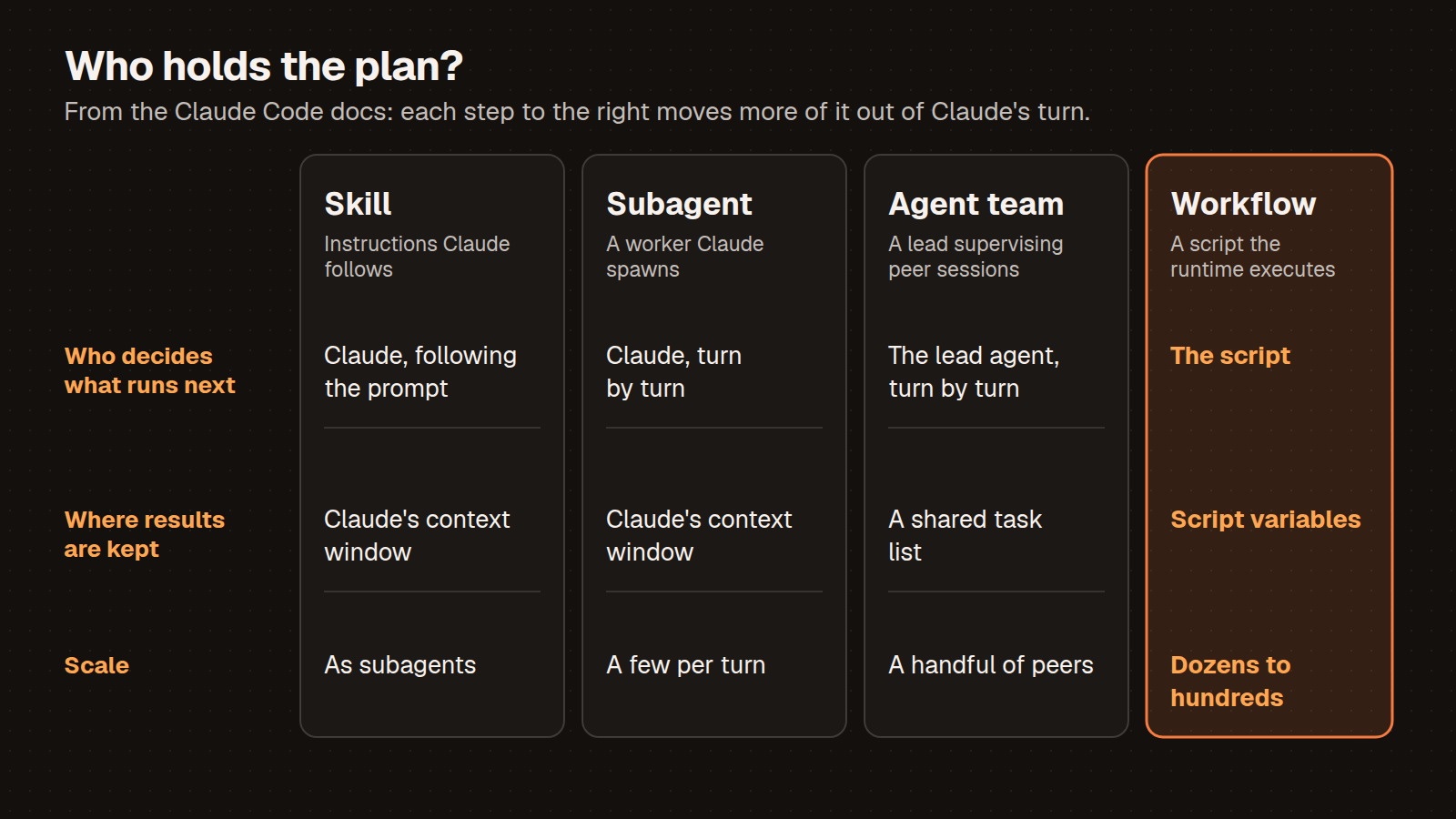
Adapted from the table in the Claude Code workflows docs. The further right, the less of the plan sits in Claude's turn.
Dynamic workflows. A workflow is a JavaScript script that orchestrates many subagents. Claude writes it for the task, and a runtime executes it in the background while your session stays responsive. Intermediate results stay in script variables, so your context holds only the final answer. They arrived in v2.1.154.
Limits: up to 16 agents at a time by default, and 1,000 agents per run. /workflows shows progress. A run you like can be saved as a /<name> command in .claude/workflows/. There is no mid-run user input. Reach for one when a job outgrows a handful of subagents, such as a codebase-wide audit, or when you want findings cross-checked before you see them.
Agent teams. A lead session coordinates teammates that each have their own context window and message each other directly, with a shared task list. They are experimental and off until you set CLAUDE_CODE_EXPERIMENTAL_AGENT_TEAMS=1. The docs call them best for research and review where teammates challenge each other, and weaker for sequential work or same-file edits. One gotcha: with teams on, a subagent that Claude names launches as a teammate, so a team can form when you did not ask for one.
There is an argument against going wide. Cognition's engineering post argues that agents should share full context, not just messages, because actions carry implicit decisions and conflicting decisions carry bad results. A fork is the nearest Claude Code feature to that advice. Our reading: start with the main conversation, add a subagent when the work is self-contained, and treat workflows as a tool for jobs you would otherwise spread over an afternoon.
What does each option cost, and how do you measure it?
| Option | What you pay | Where to look |
|---|---|---|
| Skill | Description each request; body once, then every turn it stays | /context, /skills (press t to sort by tokens) |
| Subagent | Its own requests on top of yours, plus its startup context | /usage attribution |
| Fork | Same, with the parent's prompt cache shared | /usage |
| Workflow | Many agents; a Large workflow warning appears past 25 agents or 1.5 million projected tokens | /workflows per-agent tokens |
| Agent team | One full instance per active teammate | /usage |
The docs say plainly that every subagent sends its own requests on top of the main conversation's. On Pro, Max, Ultra, Team and Enterprise plans, /usage breaks recent usage down by skills, subagents, plugins and MCP servers. Their warning threshold for subagent descriptions is 15,000 tokens combined.
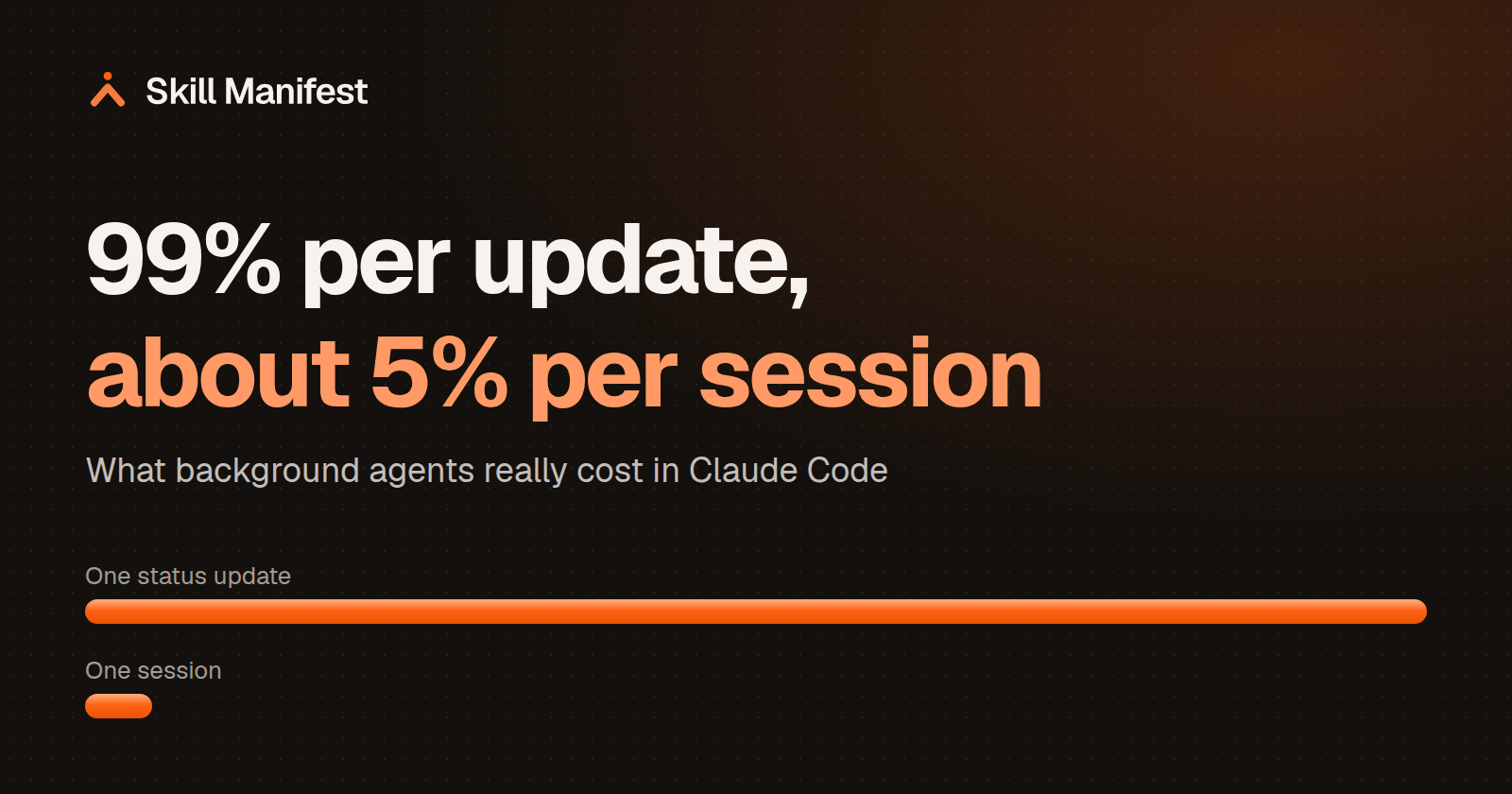
For scale from outside the docs, Anthropic reported for its own research system that agents use about 4 times the tokens of chat, and multi-agent systems about 15 times. That is a different product, but it is why isolation is not a free win. For the subagent bill in more detail, see what background agents really cost.
Exercise: measure the same task three ways. Pick a question that needs many files, such as "where do we validate session tokens?"
- In a fresh session, run
/context. Ask the question directly. Run/contextagain and note how much the conversation grew. - Run
/clear. Run/context, then ask: "Use a subagent to find where we validate session tokens and report file and line." Run/contextagain, then/usage. - Run
/clear. Write the question as a skill withcontext: forkandagent: Explore, run it, and compare the same three numbers.
Compare the growth of your main window, and then compare what /usage attributes to subagents. We did not run these sessions for this post, so we give no numbers here. Distrust any figures that do not state the setup they came from. The mechanism is above; your repository decides the rest.
Our field guide's context lesson walks through what loads when, with a subagent's separate window drawn out. Lessons 1 to 3 are free.
FAQ
Can a subagent use skills?
Yes. List them in skills: to inject their full content at startup. Without that field a subagent can still find and invoke project, user and plugin skills through the Skill tool.
Can a skill call a subagent?
Yes, two ways. Set context: fork and agent so the skill itself runs in a subagent. Or write steps that tell Claude to spawn subagents, as in the /audit example above.
Does a subagent see my CLAUDE.md?
Yes for custom and general-purpose subagents. Explore and Plan skip it, and omitClaudeMd: true removes the user, project and local files for your own.
Is /agents still how I create subagents?
After v2.1.197, /agents prints a reminder to ask Claude or edit .claude/agents/ or ~/.claude/agents/ yourself. On v2.1.197 and earlier it opens a wizard.
Which one is cheaper?
Neither, by default. A skill spends your main window. A subagent spends its own window and requests. Measure with the exercise above before you decide.
Put the stable parts of your setup where they load least often, then check the result with /context. To put skills and agents into a setup for your stack, build your Claude Code setup.
Sources
- code.claude.com/docs/en/features-overview
- code.claude.com/docs/en/skills
- code.claude.com/docs/en/sub-agents
- code.claude.com/docs/en/workflows
- code.claude.com/docs/en/agents
- code.claude.com/docs/en/agent-teams
- code.claude.com/docs/en/context-window
- code.claude.com/docs/en/costs
- code.claude.com/docs/en/commands
- code.claude.com/docs/en/hooks
- github.com/anthropics/claude-code/blob/main/CHANGELOG.md
- claude.com/blog/steering-claude-code-skills-hooks-rules-subagents-and-more
- claude.com/resources/articles/subagents-in-claude-code
- www.anthropic.com/engineering/multi-agent-research-system
- cognition.ai/blog/dont-build-multi-agents
- chipp.ai/blog/skills-vs-sub-agents
- dev.to/nunc/claude-code-skills-vs-subagents-when-to-use-what-4d12
- github.com/anthropics/claude-code/issues/92750
- skillmanifest.co/learn/context